Build a World Cup 2026 Live Tracker
Learn how to build a real-time World Cup match tracker with live scores, lineups, match events, and video highlights all from a single API.
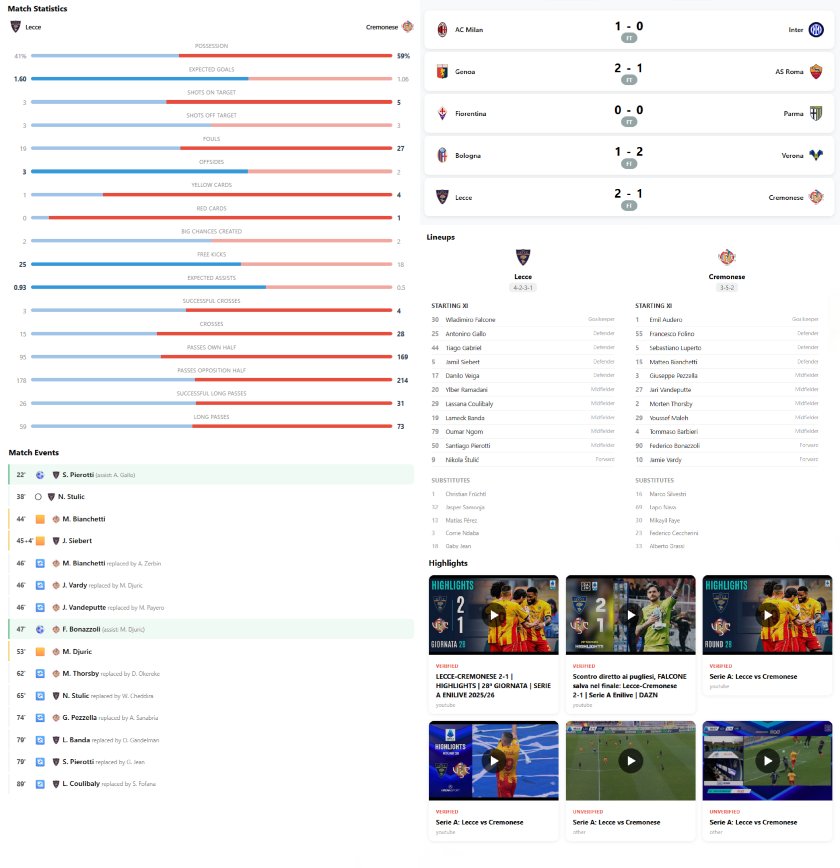
The 2026 World Cup is happening this summer with 48 teams, 104 matches, three countries hosting (US, Canada, Mexico). Now, if you're a developer, this is honestly one of the best chances you'll get to build something that people actually want to use. During the tournament, millions of people will be refreshing tabs and pulling down on their phones looking for scores, goals, and highlights. What if you had your own app serving that up?
That's what we're building today. A live World Cup tracker that pulls in match scores, events (goals, cards, subs), team lineups, match stats and actual video highlights. We're using Highlightly's Football API for all of it, which means one API key, one data source and no duct-taping three different services together. We'll use React on the frontend and a small Node/Express backend to keep the API key safe. If React isn't your thing, the logic works the same in Vue, Svelte, or plain JavaScript. Swap out the components and you're good to go.
One thing to know upfront is that the World Cup 2026 league ID in
Highlightly is 1635. That's the ID
that will scope every API call to just World Cup matches. You'll see
it everywhere in the code below. Since there are no World Cup matches
being played yet, we can swap the ID, for testing purposes, to
something else such as Serie A with ID
115669.
Project preparation
To get started, we need the following:
- Sign up at Highlightly. Alternatively, you can create a RapidAPI account, but you will need to swap some endpoints in the upcoming sections. There's a free BASIC tier which can be used for prototyping. For full World Cup access you'll want at least PRO plan, but you can start without it.
- Node.js v18 or newer. Anything recent will do.
-
Some React experience. You don't need to be an expert, but you
should know what
useStateanduseEffectdo. -
npmoryarnwhichever you prefer. - Optionally, you can create an account on Vercel or Render if you want to deploy the finished app.
Let's set up the project:
          npx create-react-app world-cup-tracker
cd world-cup-tracker
npm install axios
And set up a small Express server so we're not exposing our API key in the browser:
          mkdir server && cd server
npm init -y
npm install express axios cors dotenv
Next, create a .env file in
server/ folder:
HIGHLIGHTLY_API_KEY=your_api_key_here
That's the base setup. Now we can start writing some code.
A Quick Look at the Highlightly Football API
Before we start building components, it helps to understand what we're working with. The base URL for Highlightly's platform is https://soccer.highlightly.net. If you are using the RapidAPI platform, you will need to swap to the other base URL https://football-highlights-api.p.rapidapi.com
Every request needs two headers:
           const headers = {
  "X-RapidAPI-Key": process.env.HIGHLIGHTLY_API_KEY,
  // Only needed for RapidAPI platform
  "X-RapidAPI-Host": "football-highlights-api.p.rapidapi.com",
};
The data is organized pretty intuitively and goes from
leagues → matches → events → highlights. Since we only care
about the World Cup, we'll pass
leagueId=1635 on basically every
call.
Here is a subset of endpoints we'll actually use:
-
GET /matches: Fetch matches by league, date, team, timezone, etc. -
GET /matches/{matchId}: Get full details for one match. -
GET /lineups/{matchId}: Get confirmed lineups for a match -
GET /highlights: Fetch video highlights. -
GET /leagues: Browse available leagues.
Each endpoint has various query parameters you can use for data
filtration. There's also limit and
offset for pagination, which you'll
need to use. If you've worked with any REST API before, this will feel
familiar.
Setting Up the Backend Proxy
We need a thin layer between the browser and Highlightly so the API
key stays on the server. This is about 50 lines of Express code.
Create a new
server/index.js file:
          const express = require("express");
const axios = require("axios");
const cors = require("cors");
require("dotenv").config();

const app = express();
app.use(cors());

const API_BASE = "https://soccer.highlightly.net";
const LEAGUE_ID = "1635"; // World Cup 2026

const headers = {
  "X-RapidAPI-Key": process.env.HIGHLIGHTLY_API_KEY,
  // Only needed for RapidAPI platform
  // "X-RapidAPI-Host": process.env.RAPIDAPI_HOST,
};

// Get matches for a specific date
app.get("/api/matches", async (req, res) => {
  try {
    const { date, timezone = "US/Eastern" } = req.query;
    const response = await axios.get(`${API_BASE}/matches`, {
      headers,
      params: { leagueId: LEAGUE_ID, date, timezone, limit: 50 },
    });
    res.json(response.data);
  } catch (error) {
    console.error("Error fetching matches:", error.message);
    res.status(500).json({ error: "Failed to fetch matches" });
  }
});

// Get details for a single match
app.get("/api/matches/:matchId", async (req, res) => {
  try {
    const response = await axios.get(
      `${API_BASE}/matches/${req.params.matchId}`,
      { headers }
    );
    res.json(response.data);
  } catch (error) {
    console.error("Error fetching match details:", error.message);
    res.status(500).json({ error: "Failed to fetch match details" });
  }
});

// Get lineups for a specific match
app.get("/api/lineups/:matchId", async (req, res) => {
  try {
    const response = await axios.get(
      `${API_BASE}/lineups/${req.params.matchId}`,
      { headers }
    );
    res.json(response.data);
  } catch (error) {
    console.error("Error fetching lineups:", error.message);
    res.status(500).json({ error: "Failed to fetch lineups" });
  }
});

// Get highlights (optionally filtered by matchId)
app.get("/api/highlights", async (req, res) => {
  try {
    const { date, timezone = "Etc/UTC", matchId } = req.query;
    const params = { leagueId: LEAGUE_ID };
    if (date) params.date = date;
    if (timezone) params.timezone = timezone;
    if (matchId) params.matchId = matchId;

    const response = await axios.get(`${API_BASE}/highlights`, {
      headers,
      params,
    });
    res.json(response.data);
  } catch (error) {
    console.error("Error fetching highlights:", error.message);
    res.status(500).json({ error: "Failed to fetch highlights" });
  }
});

const PORT = process.env.PORT || 3001;
app.listen(PORT, () => console.log(`Server running on port ${PORT}`));
Run node index.js and you've got a
local API at localhost:3001/api/*.
The frontend will talk to this instead of hitting Highlightly
directly.
Fetching Live World Cup Matches
Time for the fun part. Let's make our first API call.
Create a new src/api.js file. This is
a small service layer, so we're not scattering axios calls everywhere.
          import axios from "axios";

const API = axios.create({
  baseURL: process.env.REACT_APP_API_URL || "http://localhost:3001/api",
});

export async function getMatches(date) {
  const { data } = await API.get("/matches", {
    params: { date, timezone: Intl.DateTimeFormat().resolvedOptions().timeZone },
  });

  return data;
}

export async function getMatchDetails(matchId) {
  const { data } = await API.get(`/matches/${matchId}`);

  return data;
}

export async function getLineups(matchId) {
  const { data } = await API.get(`/lineups/${matchId}`);

  return data;
}

export async function getHighlights(params) {
  const { data } = await API.get("/highlights", { params });

  return data;
}
A couple of things to notice. We pull the API URL from an environment
variable (useful when you deploy later), we detect the user's timezone
automatically instead of hardcoding it, and lineups get their own
function because they live at a separate endpoint (/lineups/{matchId}) rather than being part of the match details response. Here's
roughly what the match object looks like when it comes back. For
demonstration purposes, let's showcase a match from Serie A:
[
{
"venue": {
"city": "Reggio Emilia",
"name": "Mapei Stadium - Citta del Tricolore",
"country": "Italy",
"capacity": "21525"
},
"referee": {
"name": "Marinelli, Livio",
"nationality": "Italy"
},
"forecast": {
"status": "clear night",
"temperature": "7.49°C"
},
"events": [
{
"team": {
"id": 416072,
"logo": "https://highlightly.net/soccer/images/teams/416072.png",
"name": "Sassuolo"
},
"time": "17",
"type": "Yellow Card",
"assist": null,
"player": "W. Coulibaly",
"playerId": 20662572,
"substituted": null,
"assistingPlayerId": null
},
{
"team": {
"id": 416072,
"logo": "https://highlightly.net/soccer/images/teams/416072.png",
"name": "Sassuolo"
},
"time": "36",
"type": "Substitution",
"assist": null,
"player": "W. Coulibaly",
"playerId": 20662572,
"substituted": "F. Romagna",
"assistingPlayerId": 4919670
},
{
"team": {
"id": 429688,
"logo": "https://highlightly.net/soccer/images/teams/429688.png",
"name": "Verona"
},
"time": "39",
"type": "Yellow Card",
"assist": null,
"player": "A. Edmundsson",
"playerId": 27256971,
"substituted": null,
"assistingPlayerId": null
},
{
"team": {
"id": 416072,
"logo": "https://highlightly.net/soccer/images/teams/416072.png",
"name": "Sassuolo"
},
"time": "40",
"type": "Goal",
"assist": "A. Lauriente",
"player": "A. Pinamonti",
"playerId": 5006288,
"substituted": null,
"assistingPlayerId": 356769
},
{
"team": {
"id": 416072,
"logo": "https://highlightly.net/soccer/images/teams/416072.png",
"name": "Sassuolo"
},
"time": "44",
"type": "Missed Penalty",
"assist": "D. Berardi",
"player": "D. Berardi",
"playerId": 4916611,
"substituted": null,
"assistingPlayerId": 4916611
},
{
"team": {
"id": 416072,
"logo": "https://highlightly.net/soccer/images/teams/416072.png",
"name": "Sassuolo"
},
"time": "44",
"type": "Goal",
"assist": null,
"player": "D. Berardi",
"playerId": 4916611,
"substituted": null,
"assistingPlayerId": null
},
{
"team": {
"id": 429688,
"logo": "https://highlightly.net/soccer/images/teams/429688.png",
"name": "Verona"
},
"time": "51",
"type": "Yellow Card",
"assist": null,
"player": "Al Musrati",
"playerId": 6763120,
"substituted": null,
"assistingPlayerId": null
},
{
"team": {
"id": 416072,
"logo": "https://highlightly.net/soccer/images/teams/416072.png",
"name": "Sassuolo"
},
"time": "62",
"type": "Goal",
"assist": "A. Lauriente",
"player": "D. Berardi",
"playerId": 4916611,
"substituted": null,
"assistingPlayerId": 356769
},
{
"team": {
"id": 429688,
"logo": "https://highlightly.net/soccer/images/teams/429688.png",
"name": "Verona"
},
"time": "72",
"type": "Substitution",
"assist": null,
"player": "A. Sarr",
"playerId": 38149909,
"substituted": "D. Mosquera",
"assistingPlayerId": 9566935
},
{
"team": {
"id": 416072,
"logo": "https://highlightly.net/soccer/images/teams/416072.png",
"name": "Sassuolo"
},
"time": "72",
"type": "Substitution",
"assist": null,
"player": "A. Pinamonti",
"playerId": 5006288,
"substituted": "M. Nzola",
"assistingPlayerId": 5042352
},
{
"team": {
"id": 429688,
"logo": "https://highlightly.net/soccer/images/teams/429688.png",
"name": "Verona"
},
"time": "73",
"type": "Substitution",
"assist": null,
"player": "D. Bradaric",
"playerId": 2306801,
"substituted": "D. Oyegoke",
"assistingPlayerId": 24698842
},
{
"team": {
"id": 416072,
"logo": "https://highlightly.net/soccer/images/teams/416072.png",
"name": "Sassuolo"
},
"time": "73",
"type": "Substitution",
"assist": null,
"player": "A. Lauriente",
"playerId": 356769,
"substituted": "A. Fadera",
"assistingPlayerId": 42455693
},
{
"team": {
"id": 416072,
"logo": "https://highlightly.net/soccer/images/teams/416072.png",
"name": "Sassuolo"
},
"time": "73",
"type": "Substitution",
"assist": null,
"player": "I. Kone",
"playerId": 52815560,
"substituted": "E. Iannoni",
"assistingPlayerId": 45288005
},
{
"team": {
"id": 416072,
"logo": "https://highlightly.net/soccer/images/teams/416072.png",
"name": "Sassuolo"
},
"time": "78",
"type": "Yellow Card",
"assist": null,
"player": "S. Walukiewicz",
"playerId": 6533856,
"substituted": null,
"assistingPlayerId": null
},
{
"team": {
"id": 429688,
"logo": "https://highlightly.net/soccer/images/teams/429688.png",
"name": "Verona"
},
"time": "82",
"type": "Substitution",
"assist": null,
"player": "A. Harroui",
"playerId": 6027511,
"substituted": "T. Suslov",
"assistingPlayerId": 31368911
},
{
"team": {
"id": 429688,
"logo": "https://highlightly.net/soccer/images/teams/429688.png",
"name": "Verona"
},
"time": "82",
"type": "Substitution",
"assist": null,
"player": "K. Bowie",
"playerId": 20397244,
"substituted": "I. Vermesan",
"assistingPlayerId": 56823494
},
{
"team": {
"id": 429688,
"logo": "https://highlightly.net/soccer/images/teams/429688.png",
"name": "Verona"
},
"time": "85",
"type": "Yellow Card",
"assist": null,
"player": "Al Musrati",
"playerId": 6763120,
"substituted": null,
"assistingPlayerId": null
},
{
"team": {
"id": 429688,
"logo": "https://highlightly.net/soccer/images/teams/429688.png",
"name": "Verona"
},
"time": "85",
"type": "Red Card",
"assist": null,
"player": "Al Musrati",
"playerId": 6763120,
"substituted": null,
"assistingPlayerId": null
},
{
"team": {
"id": 416072,
"logo": "https://highlightly.net/soccer/images/teams/416072.png",
"name": "Sassuolo"
},
"time": "89",
"type": "Substitution",
"assist": null,
"player": "S. Walukiewicz",
"playerId": 6533856,
"substituted": "Pedro Felipe",
"assistingPlayerId": 66825458
}
],
"predictions": {
"live": [
{
"type": "live",
"modelType": "three-way",
"description": "Sassuolo is most likely to win the game against Verona.",
"generatedAt": "2026-02-20T19:50:14.504Z",
"probabilities": {
"away": "19.85%",
"draw": "27.48%",
"home": "52.67%"
}
},
{
"type": "live",
"modelType": "three-way",
"description": "Sassuolo is most likely to win the game against Verona.",
"generatedAt": "2026-02-20T20:00:17.559Z",
"probabilities": {
"away": "20.76%",
"draw": "29.58%",
"home": "49.66%"
}
},
{
"type": "live",
"modelType": "three-way",
"description": "Sassuolo is most likely to win the game against Verona.",
"generatedAt": "2026-02-20T20:10:20.030Z",
"probabilities": {
"away": "23.89%",
"draw": "32.99%",
"home": "43.13%"
}
},
{
"type": "live",
"modelType": "three-way",
"description": "Sassuolo is most likely to win the game against Verona.",
"generatedAt": "2026-02-20T20:20:22.081Z",
"probabilities": {
"away": "22.63%",
"draw": "35.60%",
"home": "41.76%"
}
},
{
"type": "live",
"modelType": "three-way",
"description": "Sassuolo is most likely to win the game against Verona.",
"generatedAt": "2026-02-20T20:30:26.275Z",
"probabilities": {
"away": "3.70%",
"draw": "11.57%",
"home": "84.73%"
}
},
{
"type": "live",
"modelType": "three-way",
"description": "Sassuolo is most likely to win the game against Verona.",
"generatedAt": "2026-02-20T20:40:22.858Z",
"probabilities": {
"away": "2.50%",
"draw": "8.54%",
"home": "88.96%"
}
},
{
"type": "live",
"modelType": "three-way",
"description": "Sassuolo is most likely to win the game against Verona.",
"generatedAt": "2026-02-20T20:50:21.405Z",
"probabilities": {
"away": "2.33%",
"draw": "8.28%",
"home": "89.39%"
}
},
{
"type": "live",
"modelType": "three-way",
"description": "Sassuolo is most likely to win the game against Verona.",
"generatedAt": "2026-02-20T21:00:23.095Z",
"probabilities": {
"away": "1.78%",
"draw": "7.40%",
"home": "90.82%"
}
},
{
"type": "live",
"modelType": "three-way",
"description": "Sassuolo is most likely to win the game against Verona.",
"generatedAt": "2026-02-20T21:10:21.971Z",
"probabilities": {
"away": "1.41%",
"draw": "5.98%",
"home": "92.60%"
}
},
{
"type": "live",
"modelType": "three-way",
"description": "Sassuolo is most likely to win the game against Verona.",
"generatedAt": "2026-02-20T21:20:21.494Z",
"probabilities": {
"away": "1.41%",
"draw": "5.98%",
"home": "92.60%"
}
},
{
"type": "live",
"modelType": "three-way",
"description": "Sassuolo is most likely to win the game against Verona.",
"generatedAt": "2026-02-20T21:30:20.406Z",
"probabilities": {
"away": "1.44%",
"draw": "5.31%",
"home": "93.26%"
}
}
],
"prematch": [
{
"type": "prematch",
"modelType": "three-way",
"description": "Sassuolo is most likely to win the game against Verona.",
"generatedAt": "2026-02-13T04:19:02.743Z",
"probabilities": {
"away": "21.09%",
"draw": "30.61%",
"home": "48.30%"
}
},
{
"type": "prematch",
"modelType": "three-way",
"description": "Sassuolo is most likely to win the game against Verona.",
"generatedAt": "2026-02-14T04:16:00.501Z",
"probabilities": {
"away": "21.42%",
"draw": "30.69%",
"home": "47.89%"
}
},
{
"type": "prematch",
"modelType": "three-way",
"description": "Sassuolo is most likely to win the game against Verona.",
"generatedAt": "2026-02-15T03:36:20.492Z",
"probabilities": {
"away": "22.20%",
"draw": "31.23%",
"home": "46.57%"
}
},
{
"type": "prematch",
"modelType": "three-way",
"description": "Sassuolo is most likely to win the game against Verona.",
"generatedAt": "2026-02-16T02:53:56.368Z",
"probabilities": {
"away": "20.13%",
"draw": "29.29%",
"home": "50.57%"
}
},
{
"type": "prematch",
"modelType": "three-way",
"description": "Sassuolo is most likely to win the game against Verona.",
"generatedAt": "2026-02-17T02:47:38.304Z",
"probabilities": {
"away": "19.68%",
"draw": "28.90%",
"home": "51.42%"
}
},
{
"type": "prematch",
"modelType": "three-way",
"description": "Sassuolo is most likely to win the game against Verona.",
"generatedAt": "2026-02-18T02:41:24.856Z",
"probabilities": {
"away": "19.05%",
"draw": "28.22%",
"home": "52.73%"
}
},
{
"type": "prematch",
"modelType": "three-way",
"description": "Sassuolo is most likely to win the game against Verona.",
"generatedAt": "2026-02-19T02:35:24.916Z",
"probabilities": {
"away": "19.10%",
"draw": "28.09%",
"home": "52.81%"
}
},
{
"type": "prematch",
"modelType": "three-way",
"description": "Sassuolo is most likely to win the game against Verona.",
"generatedAt": "2026-02-20T02:26:18.366Z",
"probabilities": {
"away": "18.09%",
"draw": "27.64%",
"home": "54.27%"
}
},
{
"type": "prematch",
"modelType": "three-way",
"description": "Sassuolo is most likely to win the game against Verona.",
"generatedAt": "2026-02-20T09:11:36.680Z",
"probabilities": {
"away": "18.45%",
"draw": "27.80%",
"home": "53.75%"
}
}
]
},
"statistics": [
{
"team": {
"id": 416072,
"logo": "https://highlightly.net/soccer/images/teams/416072.png",
"name": "Sassuolo"
},
"statistics": [
{
"value": 2,
"displayName": "Expected Goals"
},
{
"value": 4,
"displayName": "Big Chances Created"
},
{
"value": 12,
"displayName": "Free Kicks"
},
{
"value": 0.59,
"displayName": "Expected Assists"
},
{
"value": 5,
"displayName": "Successful Crosses"
},
{
"value": 16,
"displayName": "Crosses"
},
{
"value": 228,
"displayName": "Passes Own Half"
},
{
"value": 214,
"displayName": "Passes Opposition Half"
},
{
"value": 16,
"displayName": "Successful Long Passes"
},
{
"value": 38,
"displayName": "Long Passes"
},
{
"value": 11,
"displayName": "Throw-Ins"
},
{
"value": 6,
"displayName": "Key Passes"
},
{
"value": 65,
"displayName": "Passes Into Final Third"
},
{
"value": 59,
"displayName": "Backward Passes"
},
{
"value": 9,
"displayName": "Goal Kicks"
},
{
"value": 9,
"displayName": "Interceptions"
},
{
"value": 8,
"displayName": "Successful Tackles"
},
{
"value": 13,
"displayName": "Tackles"
},
{
"value": 36,
"displayName": "Clearances"
},
{
"value": 9,
"displayName": "Successful Aerial Duels"
},
{
"value": 21,
"displayName": "Aerial Duels"
},
{
"value": 4,
"displayName": "Successful Dribbles"
},
{
"value": 7,
"displayName": "Dribbles"
},
{
"value": 0.5,
"displayName": "Shots accuracy"
},
{
"value": 58,
"displayName": "Failed passes"
},
{
"value": 0.47,
"displayName": "Possession"
},
{
"value": 4,
"displayName": "Shots on target"
},
{
"value": 6,
"displayName": "Corners"
},
{
"value": 1,
"displayName": "Offsides"
},
{
"value": 368,
"displayName": "Successful passes"
},
{
"value": 0,
"displayName": "Red cards"
},
{
"value": 3,
"displayName": "Shots off target"
},
{
"value": 1,
"displayName": "Blocked shots"
},
{
"value": 7,
"displayName": "Shots within penalty area"
},
{
"value": 426,
"displayName": "Total passes"
},
{
"value": 1,
"displayName": "Shots outside penalty area"
},
{
"value": 1,
"displayName": "Goalkeeper saves"
},
{
"value": 12,
"displayName": "Fouls"
},
{
"value": 2,
"displayName": "Yellow cards"
}
]
},
{
"team": {
"id": 429688,
"logo": "https://highlightly.net/soccer/images/teams/429688.png",
"name": "Verona"
},
"statistics": [
{
"value": 0.71,
"displayName": "Expected Goals"
},
{
"value": 0,
"displayName": "Big Chances Created"
},
{
"value": 12,
"displayName": "Free Kicks"
},
{
"value": 0.46,
"displayName": "Expected Assists"
},
{
"value": 3,
"displayName": "Successful Crosses"
},
{
"value": 25,
"displayName": "Crosses"
},
{
"value": 251,
"displayName": "Passes Own Half"
},
{
"value": 247,
"displayName": "Passes Opposition Half"
},
{
"value": 28,
"displayName": "Successful Long Passes"
},
{
"value": 52,
"displayName": "Long Passes"
},
{
"value": 17,
"displayName": "Throw-Ins"
},
{
"value": 10,
"displayName": "Key Passes"
},
{
"value": 80,
"displayName": "Passes Into Final Third"
},
{
"value": 78,
"displayName": "Backward Passes"
},
{
"value": 6,
"displayName": "Goal Kicks"
},
{
"value": 13,
"displayName": "Interceptions"
},
{
"value": 9,
"displayName": "Successful Tackles"
},
{
"value": 12,
"displayName": "Tackles"
},
{
"value": 14,
"displayName": "Clearances"
},
{
"value": 12,
"displayName": "Successful Aerial Duels"
},
{
"value": 21,
"displayName": "Aerial Duels"
},
{
"value": 2,
"displayName": "Successful Dribbles"
},
{
"value": 7,
"displayName": "Dribbles"
},
{
"value": 0.08,
"displayName": "Shots accuracy"
},
{
"value": 66,
"displayName": "Failed passes"
},
{
"value": 0.53,
"displayName": "Possession"
},
{
"value": 1,
"displayName": "Shots on target"
},
{
"value": 5,
"displayName": "Corners"
},
{
"value": 2,
"displayName": "Offsides"
},
{
"value": 407,
"displayName": "Successful passes"
},
{
"value": 1,
"displayName": "Red cards"
},
{
"value": 5,
"displayName": "Shots off target"
},
{
"value": 6,
"displayName": "Blocked shots"
},
{
"value": 8,
"displayName": "Shots within penalty area"
},
{
"value": 473,
"displayName": "Total passes"
},
{
"value": 4,
"displayName": "Shots outside penalty area"
},
{
"value": 1,
"displayName": "Goalkeeper saves"
},
{
"value": 14,
"displayName": "Fouls"
},
{
"value": 2,
"displayName": "Yellow cards"
}
]
}
],
"id": 1172783457,
"round": "Regular Season - 26",
"date": "2026-02-20T19:45:00.000Z",
"country": {
"code": "IT",
"name": "Italy",
"logo": "https://highlightly.net/soccer/images/countries/IT.svg"
},
"state": {
"clock": 90,
"score": {
"current": "3 - 0",
"penalties": null
},
"description": "Finished"
},
"awayTeam": {
"id": 429688,
"logo": "https://highlightly.net/soccer/images/teams/429688.png",
"name": "Verona",
"topPlayers": [
{
"name": "Amin Sarr",
"position": "Attacker",
"statistics": [
{
"name": "Expected Goals",
"value": 0.24
},
{
"name": "Shots On Target",
"value": 1
},
{
"name": "Minutes",
"value": 72
}
]
},
{
"name": "Domagoj Bradarić",
"position": "Midfielder",
"statistics": [
{
"name": "Expected Goals",
"value": 0.03
},
{
"name": "Shots On Target",
"value": 0
},
{
"name": "Minutes",
"value": 72
}
]
},
{
"name": "Victor Nelsson",
"position": "Defender",
"statistics": [
{
"name": "Interceptions",
"value": 2
},
{
"name": "Clearances",
"value": 5
},
{
"name": "Minutes",
"value": 90
}
]
}
],
"shots": [
{
"time": "15'",
"outcome": "Blocked",
"goalTarget": "Low Centre",
"playerName": "Kieron Bowie"
},
{
"time": "16'",
"outcome": "Blocked",
"goalTarget": "Low Right",
"playerName": "Amin Sarr"
},
{
"time": "21'",
"outcome": "Missed",
"goalTarget": null,
"playerName": "Martin Frese"
},
{
"time": "42'",
"outcome": "Blocked",
"goalTarget": "Low Centre",
"playerName": "Abdou Harroui"
},
{
"time": "48'",
"outcome": "Missed",
"goalTarget": null,
"playerName": "Moatasem Al-Musrati"
},
{
"time": "53'",
"outcome": "Missed",
"goalTarget": null,
"playerName": "Kieron Bowie"
},
{
"time": "60'",
"outcome": "Blocked",
"goalTarget": "Low Centre",
"playerName": "Amin Sarr"
},
{
"time": "60'",
"outcome": "Blocked",
"goalTarget": "Low Centre",
"playerName": "Moatasem Al-Musrati"
},
{
"time": "61'",
"outcome": "Blocked",
"goalTarget": "Low Left",
"playerName": "Amin Sarr"
},
{
"time": "69'",
"outcome": "Saved",
"goalTarget": "Low Left",
"playerName": "Amin Sarr"
},
{
"time": "72'",
"outcome": "Missed",
"goalTarget": null,
"playerName": "Domagoj Bradarić"
},
{
"time": "77'",
"outcome": "Missed",
"goalTarget": "CloseLeft",
"playerName": "Daniel Mosquera"
}
]
},
"homeTeam": {
"id": 416072,
"logo": "https://highlightly.net/soccer/images/teams/416072.png",
"name": "Sassuolo",
"topPlayers": [
{
"name": "Domenico Berardi",
"position": "Attacker",
"statistics": [
{
"name": "Expected Goals",
"value": 1.4
},
{
"name": "Shots On Target",
"value": 3
},
{
"name": "Minutes",
"value": 90
}
]
},
{
"name": "Kristian Thorstvedt",
"position": "Midfielder",
"statistics": [
{
"name": "Expected Goals",
"value": 0.41
},
{
"name": "Shots On Target",
"value": 0
},
{
"name": "Minutes",
"value": 90
}
]
},
{
"name": "Jay Idzes",
"position": "Defender",
"statistics": [
{
"name": "Interceptions",
"value": 1
},
{
"name": "Clearances",
"value": 11
},
{
"name": "Minutes",
"value": 90
}
]
}
],
"shots": [
{
"time": "37'",
"outcome": "Missed",
"goalTarget": null,
"playerName": "Luca Lipani"
},
{
"time": "40'",
"outcome": "Missed",
"goalTarget": null,
"playerName": "Fillipo Romagna"
},
{
"time": "40'",
"outcome": "Goal",
"goalTarget": "Low Centre",
"playerName": "Andrea Pinamonti"
},
{
"time": "44'",
"outcome": "Saved",
"goalTarget": "Low Centre",
"playerName": "Domenico Berardi"
},
{
"time": "44'",
"outcome": "Goal",
"goalTarget": "Low Centre",
"playerName": "Domenico Berardi"
},
{
"time": "54'",
"outcome": "Missed",
"goalTarget": null,
"playerName": "Kristian Thorstvedt"
},
{
"time": "62'",
"outcome": "Goal",
"goalTarget": "Low Left",
"playerName": "Domenico Berardi"
},
{
"time": "67'",
"outcome": "Blocked",
"goalTarget": "Low Right",
"playerName": "Kristian Thorstvedt"
}
]
},
"league": {
"id": 115669,
"logo": "https://highlightly.net/soccer/images/leagues/115669.png",
"name": "Serie A",
"season": 2025
},
"news": []
}
]
There's no top-level status. Instead,
everything lives inside a
state object. The
state.description
tells you what phase the match is in (things like
Not Started, First Half, Half Time,
Second Half, Extra Time, Penalty Shootout,
Finished, Postponed, Suspended, etc.). The score
is a formatted string in
state.score.current like
3 - 0, and state.clock gives
you the current match minute.
For the UI, we'll collapse those descriptions into four groups: scheduled (not started yet), live (any active play or half-time break), ended (finished, however it ended), and other (postponed, suspended, canceled). That keeps the badge logic clean.
The match detail response also includes an
events array. Each event looks like
this:
          {
  "team": { "id": 512, "name": "Mexico", "logo": "https://..." },
  "time": "40",
  "type": "Goal",
  "player": "S. Gimenez",
  "playerId": 5006288,
  "assist": "E. Alvarez",
  "assistingPlayerId": 356769,
  "substituted": null
}
You'll also find venue,
referee,
forecast (weather),
statistics (per-team match stats like
possession, xG, shots, corners),
predictions (pre-match and live win
probabilities), and shots data on
each team. We'll build a statistics panel later in the tutorial. The
rest is there if you want to extend the tracker further.
To keep things feeling real-time, we'll poll every 60 seconds. That's a good balance between freshness and not blowing through your rate limit.
Building the Live Score UI
The match cards are the core of the app. Each card shows two teams,
the score (or kickoff time), and a status indicator. Create a new
src/components/MatchCard.jsx file:
          import React from "react";

// Map API state descriptions to our four UI categories
const LIVE_STATES = [
  "First Half", "Second Half", "Half Time",
  "Extra Time", "Extra Time Half Time",
  "Penalty Shootout", "Break Time",
];
const ENDED_STATES = [
  "Finished", "Finished AET", "Finished AP",
  "Finished After Extra Time", "Finished After Penalties",
];
const SCHEDULED_STATES = ["Not Started"];

function getMatchPhase(description) {
  if (!description) return "scheduled";
  if (LIVE_STATES.includes(description)) return "live";
  if (ENDED_STATES.includes(description)) return "ended";
  if (SCHEDULED_STATES.includes(description)) return "scheduled";
  // Anything else — Postponed, Suspended, Cancelled, Abandoned, etc.
  return "other";
}

function StatusBadge({ description, clock }) {
  const phase = getMatchPhase(description);

  const config = {
    live:      { bg: "#e74c3c", label: clock ? `${clock}'` : "LIVE" },
    ended:     { bg: "#95a5a6", label: "FT" },
    scheduled: { bg: "#3498db", label: "Upcoming" },
    other:     { bg: "#e67e22", label: description || "TBD" },
  };

  const { bg, label } = config[phase];

  return (
    <span
      style={{
        backgroundColor: bg,
        color: "white",
        padding: "4px 12px",
        borderRadius: "12px",
        fontSize: "12px",
        fontWeight: "bold",
        textTransform: "uppercase",
        animation: phase === "live" ? "pulse 1.5s infinite" : "none",
      }}
    >
      {label}
    </span>
  );
}

function MatchCard({ match, onClick }) {
  const { state } = match;
  const phase = getMatchPhase(state?.description);

  return (
    <div
      onClick={() => onClick(match.id)}
      style={{
        display: "flex",
        alignItems: "center",
        justifyContent: "space-between",
        padding: "16px 24px",
        margin: "8px 0",
        borderRadius: "12px",
        backgroundColor: "#ffffff",
        boxShadow: "0 2px 8px rgba(0,0,0,0.08)",
        cursor: "pointer",
        transition: "transform 0.15s ease",
      }}
    >
      {/* Home Team */}
      <div style={{ display: "flex", alignItems: "center", flex: 1 }}>
        <img
          src={match.homeTeam.logo}
          alt=""
          style={{ width: 36, height: 36, marginRight: 12 }}
        />
        <span style={{ fontWeight: 600, fontSize: 16 }}>
          {match.homeTeam.name}
        </span>
      </div>

      {/* Score or Kickoff Time */}
      <div style={{ textAlign: "center", minWidth: 120 }}>
        {phase === "scheduled" ? (
          <div style={{ fontSize: 14, color: "#666" }}>
            {new Date(match.date).toLocaleTimeString([], {
              hour: "2-digit",
              minute: "2-digit",
            })}
          </div>
        ) : state?.score?.current ? (
          <div style={{ fontSize: 28, fontWeight: 700, letterSpacing: 2 }}>
            {state.score.current}
          </div>
        ) : null}
        {state?.score?.penalties && (
          <div style={{ fontSize: 12, color: "#888" }}>
            (Pens: {state.score.penalties})
          </div>
        )}
        <StatusBadge description={state?.description} clock={phase === "live" ? state?.clock : null} />
      </div>

      {/* Away Team */}
      <div
        style={{
          display: "flex",
          alignItems: "center",
          justifyContent: "flex-end",
          flex: 1,
        }}
      >
        <span style={{ fontWeight: 600, fontSize: 16 }}>
          {match.awayTeam.name}
        </span>
        <img
          src={match.awayTeam.logo}
          alt=""
          style={{ width: 36, height: 36, marginLeft: 12 }}
        />
      </div>
    </div>
  );
}

export { getMatchPhase };
export default MatchCard;
There's a bit more going on here than a simple score card, so let's break it down.
The API doesn't give you a simple live or
finished status. Instead,
state.description returns the actual
phase of the match.
We collapse all those descriptions into four UI-friendly groups using
the getMatchPhase() helper:
scheduled (match hasn't kicked off), live (any active
play or break such as first half, half time, second half, extra time,
penalties), ended (all flavors of finished), and
other (postponed, suspended, canceled or abandoned).
The score comes from
state.score.current as a
pre-formatted string, so we just render it directly. If there were
penalties, state.score.penalties will
have that too, and we show it in parentheses below the main score.
For live matches, the badge shows the current match minute from
state.clock (e.g. 72') instead
of a generic label.
You'll also want to add the pulse animation to your CSS. Drop this in
src/index.css:
          @keyframes pulse {
  0%, 100% { opacity: 1; }
  50% { opacity: 0.6; }
}
Displaying Match Events
When someone clicks a match card, they want the details such as who
scored, who got booked, which substitutions happened. Let's create the
src/components/EventTimeline.jsx
file:
          import React from "react";

// Keys match the exact `type` strings from the Highlightly API
const EVENT_CONFIG = {
  "Goal":            { icon: "\u26BD", accent: "#27ae60", highlight: true },
  "Yellow Card":     { icon: "\uD83D\uDFE8", accent: "#f0c040", highlight: false },
  "Red Card":        { icon: "\uD83D\uDFE5", accent: "#e74c3c", highlight: false },
  "Substitution":    { icon: "\uD83D\uDD04", accent: "#ecf0f1", highlight: false },
  "Missed Penalty":  { icon: "\u26BD\u274C", accent: "#e74c3c", highlight: false },
};

const DEFAULT_CONFIG = { icon: "\u25CB", accent: "#ecf0f1", highlight: false };

function EventRow({ event }) {
  const config = EVENT_CONFIG[event.type] || DEFAULT_CONFIG;

  return (
    <div
      style={{
        display: "flex",
        alignItems: "center",
        padding: "10px 16px",
        marginBottom: 4,
        borderLeft: `3px solid ${config.accent}`,
        backgroundColor: config.highlight ? "#f0faf4" : "transparent",
        borderRadius: "0 8px 8px 0",
      }}
    >
      <span style={{ fontSize: 14, fontWeight: 700, minWidth: 40, color: "#555" }}>
        {event.time}'
      </span>
      <span style={{ fontSize: 20, marginRight: 12 }}>{config.icon}</span>
      <div>
        <img
          src={event.team?.logo}
          alt=""
          style={{ width: 18, height: 18, marginRight: 6, verticalAlign: "middle" }}
        />
        <span style={{ fontWeight: 600 }}>{event.player}</span>
        {event.type === "Goal" && event.assist && (
          <span style={{ color: "#888", fontSize: 13 }}>
            {" "}(assist: {event.assist})
          </span>
        )}
        {event.type === "Substitution" && event.substituted && (
          <span style={{ color: "#888", fontSize: 13 }}>
            {" "}replaced by {event.substituted}
          </span>
        )}
      </div>
    </div>
  );
}

function EventTimeline({ events }) {
  if (!events || events.length === 0) {
    return (
      <p style={{ color: "#999", textAlign: "center", padding: "20px 0" }}>
        No match events yet. Check back once the game kicks off.
      </p>
    );
  }

  // Sort by time so the timeline reads chronologically
  const sorted = [...events].sort((a, b) => parseInt(a.time) - parseInt(b.time));

  return (
    <div style={{ padding: "16px 0" }}>
      <h3 style={{ marginBottom: 16, fontSize: 18 }}>Match Events</h3>
      {sorted.map((event, i) => (
        <EventRow key={`${event.time}-${event.type}-${event.playerId}-${i}`} event={event} />
      ))}
    </div>
  );
}

export default EventTimeline;
Here's how the event fields map to the UI.
time is the match minute the event
occurred, type is a readable label
such as Goal, Yellow Card, Red Card,
Substitution, or Missed Penalty,
player is the main actor (the scorer,
the booked player, or the player going off in a sub),
assist is the player who set up a
goal, substituted is the player
coming on to replace player. Each
event also carries a team object with
name and
logo, so you can badge every row
without cross-referencing the match data.
Goals get a green left border and a highlighted background so they pop. Cards get a yellow or red accent. Subs are neutral. The whole thing reads chronologically, top to bottom.
We sort by parseInt(event.time) since
the API returns the minute as a string.
Showing Match Statistics
Once a match kicks off, the API starts populating a
statistics array on the match object.
Each entry corresponds to one team and contains an array of
{ value, displayName } pairs. The
stats include entries such as possession, expected goals, shots on
target, corners, fouls, total passes, and a bunch more. It's
essentially the same stat panel you'd see on a TV broadcast.
Let's create a new
src/components/MatchStats.jsx file:
          import React from "react";

// Stats we always want at the top, in this order
const PRIORITY_STATS = [
  "Possession",
  "Expected Goals",
  "Total shots",
  "Shots on target",
  "Shots off target",
  "Corner kicks",
  "Fouls",
  "Offsides",
  "Yellow cards",
  "Red cards",
];

function formatValue(value, displayName) {
  if (displayName === "Possession") {
    // API gives possession as a decimal like 0.62
    return typeof value === "number" && value <= 1
      ? `${Math.round(value * 100)}%`
      : `${value}%`;
  }
  if (displayName === "Expected Goals") {
    return typeof value === "number" ? value.toFixed(2) : value;
  }
  return value ?? "-";
}

function getBarRatio(homeVal, awayVal, displayName) {
  // For possession, values are already proportional
  if (displayName === "Possession") {
    const h = typeof homeVal === "number" && homeVal <= 1 ? homeVal : parseFloat(homeVal) / 100;
    return Math.max(0.05, Math.min(0.95, h));
  }
  const h = parseFloat(homeVal) || 0;
  const a = parseFloat(awayVal) || 0;
  if (h + a === 0) return 0.5;
  return Math.max(0.05, Math.min(0.95, h / (h + a)));
}

function StatRow({ displayName, homeValue, awayValue }) {
  const ratio = getBarRatio(homeValue, awayValue, displayName);
  const homeFormatted = formatValue(homeValue, displayName);
  const awayFormatted = formatValue(awayValue, displayName);

  // Highlight the "winning" side
  const h = parseFloat(homeValue) || 0;
  const a = parseFloat(awayValue) || 0;
  const homeBold = h > a;
  const awayBold = a > h;

  return (
    <div style={{ marginBottom: 12 }}>
      {/* Stat label */}
      <div
        style={{
          textAlign: "center",
          fontSize: 12,
          color: "#888",
          marginBottom: 4,
          textTransform: "uppercase",
          letterSpacing: 0.5,
        }}
      >
        {displayName}
      </div>
      {/* Values and bar */}
      <div style={{ display: "flex", alignItems: "center", gap: 10 }}>
        <span
          style={{
            minWidth: 42,
            textAlign: "right",
            fontWeight: homeBold ? 700 : 400,
            fontSize: 14,
            color: homeBold ? "#2c3e50" : "#888",
          }}
        >
          {homeFormatted}
        </span>
        <div
          style={{
            flex: 1,
            height: 8,
            backgroundColor: "#f0f0f0",
            borderRadius: 4,
            overflow: "hidden",
            display: "flex",
          }}
        >
          <div
            style={{
              width: `${ratio * 100}%`,
              backgroundColor: homeBold ? "#3498db" : "#a0c4e8",
              borderRadius: "4px 0 0 4px",
              transition: "width 0.4s ease",
            }}
          />
          <div
            style={{
              flex: 1,
              backgroundColor: awayBold ? "#e74c3c" : "#f0a8a0",
              borderRadius: "0 4px 4px 0",
              transition: "width 0.4s ease",
            }}
          />
        </div>
        <span
          style={{
            minWidth: 42,
            textAlign: "left",
            fontWeight: awayBold ? 700 : 400,
            fontSize: 14,
            color: awayBold ? "#2c3e50" : "#888",
          }}
        >
          {awayFormatted}
        </span>
      </div>
    </div>
  );
}

function MatchStats({ statistics }) {
  if (!statistics || statistics.length < 2) {
    return (
      <p style={{ color: "#999", textAlign: "center", padding: "20px 0" }}>
        No match statistics available yet.
      </p>
    );
  }

  const home = statistics[0];
  const away = statistics[1];

  // Build a lookup from displayName → value for each team
  const homeMap = {};
  (home.statistics || []).forEach((s) => { homeMap[s.displayName] = s.value; });
  const awayMap = {};
  (away.statistics || []).forEach((s) => { awayMap[s.displayName] = s.value; });

  // Collect all stat names, prioritized ones first
  const allNames = new Set([
    ...Object.keys(homeMap),
    ...Object.keys(awayMap),
  ]);
  const prioritized = PRIORITY_STATS.filter((n) => allNames.has(n));
  const remaining = [...allNames].filter((n) => !PRIORITY_STATS.includes(n));
  const orderedStats = [...prioritized, ...remaining];

  return (
    <div style={{ padding: "16px 0" }}>
      <h3 style={{ marginBottom: 16, fontSize: 18 }}>Match Statistics</h3>

      {/* Team headers */}
      <div
        style={{
          display: "flex",
          justifyContent: "space-between",
          alignItems: "center",
          marginBottom: 20,
          padding: "0 4px",
        }}
      >
        <div style={{ display: "flex", alignItems: "center", gap: 8 }}>
          <img src={home.team.logo} alt="" style={{ width: 28, height: 28 }} />
          <span style={{ fontWeight: 600, fontSize: 14 }}>{home.team.name}</span>
        </div>
        <div style={{ display: "flex", alignItems: "center", gap: 8 }}>
          <span style={{ fontWeight: 600, fontSize: 14 }}>{away.team.name}</span>
          <img src={away.team.logo} alt="" style={{ width: 28, height: 28 }} />
        </div>
      </div>

      {/* Stat rows */}
      {orderedStats.map((name) => (
        <StatRow
          key={name}
          displayName={name}
          homeValue={homeMap[name]}
          awayValue={awayMap[name]}
        />
      ))}
    </div>
  );
}

export default MatchStats;
Let's walk through the interesting bits.
The PRIORITY_STATS array controls
which stats appear at the top. The ones people actually look for first
(possession, xG, shots, corners). Everything else the API returns
still gets rendered, just below the headline stats. That way the
component handles whatever the API sends without breaking, and if
Highlightly adds new stat types in the future, they'll show up
automatically.
Formatting needs a little attention because not all stats are integers. Possession arrives as a decimal like 0.62, which we convert to 62%. Expected Goals gets two decimal places (2.14). Everything else is shown as-is.
The bar chart for each stat is a pair of div's inside a flex container. The home team's bar (blue) takes up a proportion of the width based on its share of the combined total, so if Mexico has 7 shots on target and Canada has 2, the blue bar fills about 78% of the row. The away team's bar (red) fills the rest. There's a 5%-95% clamp, so neither side ever completely disappears, even on a 10-0 stat.
The winning side for each stat gets bold text and a saturated bar color, while the lower side gets a lighter shade and normal weight. Small thing, but it makes it much easier to scan the panel quickly.
For live matches, the stats update every time you re-fetch the match details (which happens on our 60-second polling interval). The bar widths have a CSS transition on them, so when possession shifts from 55% to 48%, the bars slide smoothly instead of jumping. Looks really nice during a live game.
Adding Team Lineups
Lineups are fetched from their own dedicated endpoint. They typically become available about 30 minutes before kickoff (or at the latest, 15 minutes after the game starts). When they're there, they add a lot to the experience.
The response structure has a couple of things worth knowing about. The
first row of initialLineup is always
the goalkeeper, and the remaining rows map directly to the formation,
so if the formation is 4-3-3, you'll get rows with 1 GK, 4
defenders, 3 midfielders, and 3 forwards.
Let's create
src/components/Lineups.jsx file:
          import React from "react";

function PlayerRow({ player, muted = false }) {
  return (
    <div
      style={{
        display: "flex",
        justifyContent: "space-between",
        padding: "6px 0",
        borderBottom: muted ? "none" : "1px solid #f0f0f0",
        fontSize: muted ? 13 : 14,
        color: muted ? "#888" : "#333",
      }}
    >
      <span>
        <strong style={{ color: muted ? "#bbb" : "#999", marginRight: 8, display: "inline-block", minWidth: 24 }}>
          {player.shirtNumber || player.number}
        </strong>
        {player.name}
      </span>
      {!muted && player.position && (
        <span style={{ color: "#aaa", fontSize: 12 }}>{player.position}</span>
      )}
    </div>
  );
}

function TeamLineup({ team, lineup }) {
  // The API returns initialLineup (starting XI) and substitutes
  const starters = lineup.initialLineup || [];
  const subs = lineup.substitutes || [];

  return (
    <div style={{ flex: 1, padding: "0 12px" }}>
      <div style={{ textAlign: "center", marginBottom: 16 }}>
        <img src={team.logo} alt="" style={{ width: 40, height: 40 }} />
        <h4 style={{ margin: "8px 0 4px" }}>{team.name}</h4>
        {lineup.formation && (
          <span
            style={{
              fontSize: 13,
              color: "#666",
              backgroundColor: "#f0f0f0",
              padding: "2px 10px",
              borderRadius: 8,
            }}
          >
            {lineup.formation}
          </span>
        )}
        {lineup.coach?.name && (
          <div style={{ fontSize: 12, color: "#999", marginTop: 4 }}>
            Coach: {lineup.coach.name}
          </div>
        )}
      </div>

      <h5 style={{ color: "#333", marginBottom: 8, fontSize: 13, textTransform: "uppercase", letterSpacing: 0.5 }}>
        Starting XI
      </h5>
      {starters.flat().map((player, i) => (
        <PlayerRow key={player.playerId || i} player={player} />
      ))}

      {subs.length > 0 && (
        <div style={{ marginTop: 16 }}>
          <h5 style={{ color: "#999", marginBottom: 8, fontSize: 13, textTransform: "uppercase", letterSpacing: 0.5 }}>
            Substitutes
          </h5>
          {subs.map((player, i) => (
            <PlayerRow key={player.playerId || i} player={player} muted />
          ))}
        </div>
      )}
    </div>
  );
}

function Lineups({ homeTeam, awayTeam, homeLineup, awayLineup }) {
  if (!homeLineup && !awayLineup) {
    return (
      <p style={{ color: "#999", textAlign: "center", padding: "20px 0" }}>
        Lineups aren't confirmed yet — they usually come out about 30 minutes before kickoff.
      </p>
    );
  }

  return (
    <div>
      <h3 style={{ marginBottom: 16, fontSize: 18 }}>Lineups</h3>
      <div style={{ display: "flex", gap: 24 }}>
        {homeLineup && <TeamLineup team={homeTeam} lineup={homeLineup} />}
        {awayLineup && <TeamLineup team={awayTeam} lineup={awayLineup} />}
      </div>
    </div>
  );
}

export default Lineups;
Home on the left, away on the right. Formation displayed as a little pill under the team name, with the coach's name below it.
Notice the .flat() call on
starters. That's because
initialLineup comes back as a nested
array grouped by formation rows (GK row, DEF row, MID row, FWD row).
We flatten it into a single list for the simple view. If you wanted to
get fancy later, you could keep the grouping and render players in a
pitch diagram instead.
Embedding Video Highlights
This is the part that really makes the tracker worth building. Most sports APIs give you numbers such as scores, stats, that kind of thing. Highlightly also gives you videos, goal clips, full match recaps, post-match interviews and penalty shootouts.
Create a new
src/components/Highlights.jsx file:
          import React, { useState } from "react";

const DEFAULT_THUMBNAIL =
  "https://upload.wikimedia.org/wikipedia/commons/1/14/No_Image_Available.jpg?20200913095930";

function HighlightCard({ highlight }) {
  const [hovered, setHovered] = useState(false);
  const linkUrl = highlight.url || highlight.embedUrl;
  const thumbnailUrl = highlight.imgUrl || DEFAULT_THUMBNAIL;

  return (
    <a
      href={linkUrl}
      target="_blank"
      rel="noopener noreferrer"
      style={{ textDecoration: "none", color: "inherit", display: "block" }}
      onMouseEnter={() => setHovered(true)}
      onMouseLeave={() => setHovered(false)}
    >
      <div
        style={{
          borderRadius: 12,
          overflow: "hidden",
          backgroundColor: "#fff",
          boxShadow: hovered
            ? "0 8px 24px rgba(0,0,0,0.15)"
            : "0 2px 8px rgba(0,0,0,0.08)",
          transition: "box-shadow 0.25s ease, transform 0.25s ease",
          transform: hovered ? "translateY(-3px)" : "translateY(0)",
        }}
      >
        {/* Thumbnail */}
        <div
          style={{
            position: "relative",
            backgroundColor: "#000",
            overflow: "hidden",
            height: 180,
          }}
        >
          <img
            src={thumbnailUrl}
            alt={highlight.title}
            onError={(e) => { e.target.src = DEFAULT_THUMBNAIL; }}
            style={{
              width: "100%",
              height: "100%",
              objectFit: "cover",
              display: "block",
              transition: "transform 0.3s ease, opacity 0.3s ease",
              transform: hovered ? "scale(1.05)" : "scale(1)",
              opacity: hovered ? 1 : 0.85,
            }}
          />
          {/* Play button overlay */}
          <div
            style={{
              position: "absolute",
              top: "50%",
              left: "50%",
              transform: "translate(-50%, -50%)",
              width: 56,
              height: 56,
              borderRadius: "50%",
              backgroundColor: hovered ? "rgba(231,76,60,0.85)" : "rgba(0,0,0,0.65)",
              display: "flex",
              alignItems: "center",
              justifyContent: "center",
              transition: "background-color 0.25s ease",
            }}
          >
            <div
              style={{
                width: 0,
                height: 0,
                borderTop: "11px solid transparent",
                borderBottom: "11px solid transparent",
                borderLeft: "18px solid white",
                marginLeft: 3,
              }}
            />
          </div>
        </div>

        {/* Label and title */}
        <div style={{ padding: "12px 16px" }}>
          <span
            style={{
              fontSize: 11,
              fontWeight: 700,
              textTransform: "uppercase",
              color: "#e74c3c",
              letterSpacing: 0.5,
            }}
          >
            {highlight.type?.replace(/_/g, " ")}
          </span>
          <h4 style={{ margin: "4px 0 0", fontSize: 15, lineHeight: 1.4 }}>
            {highlight.title}
          </h4>
          {highlight.source && (
            <span style={{ fontSize: 12, color: "#999" }}>{highlight.source}</span>
          )}
        </div>
      </div>
    </a>
  );
}

function HighlightsGrid({ highlights }) {
  if (!highlights || highlights.length === 0) {
    return (
      <p style={{ color: "#999", textAlign: "center", padding: "20px 0" }}>
        No highlights yet. Clips usually show up shortly after key moments in the match.
      </p>
    );
  }

  return (
    <div>
      <h3 style={{ marginBottom: 16, fontSize: 18 }}>Highlights</h3>
      <div
        style={{
          display: "grid",
          gridTemplateColumns: "repeat(auto-fill, minmax(280px, 1fr))",
          gap: 16,
        }}
      >
        {highlights.map((hl) => (
          <HighlightCard key={hl.id} highlight={hl} />
        ))}
      </div>
    </div>
  );
}

export default HighlightsGrid;
This version is simpler and works better in practice. Instead of
embedding an iframe inside the card, each highlight is just an
<a> tag that opens the video in a new tab. It uses
highlight.url (the direct link to the
video) with highlight.embedUrl as a
fallback.
The hover effect is all done through a
hovered state toggle. When you mouse
over a card, three things happen at once: the thumbnail scales up
slightly and goes to full opacity, the card lifts with a subtle and a
deeper shadow, and the play button overlay shifts from dark to
Highlightly's red. All transitions are 250-300ms so it feels smooth
without being sluggish.
The highlight type label gets cleaned up with
replace(/_/g, " ") for any snake case
values. And during a live match, you'd want to show goal clips at the
top.
Putting It All Together
Now let's assemble everything into the main
App component. This is where the
match list connects to the detail view:
import React, { useState, useEffect, useCallback } from "react";
import MatchCard from "./components/MatchCard";
import EventTimeline from "./components/EventTimeline";
import MatchStats from "./components/MatchStats";
import Lineups from "./components/Lineups";
import HighlightsGrid from "./components/Highlights";
import { getMatches, getMatchDetails, getLineups, getHighlights } from "./api";
function App() {
const [matches, setMatches] = useState([]);
const [selectedMatch, setSelectedMatch] = useState(null);
const [lineups, setLineups] = useState(null);
const [highlights, setHighlights] = useState([]);
const [currentDate, setCurrentDate] = useState(
new Date().toISOString().split("T")[0]
);
const [loading, setLoading] = useState(true);
const [error, setError] = useState(null);
const fetchMatches = useCallback(async () => {
setLoading(true);
setError(null);
try {
const data = await getMatches(currentDate);
setMatches(data.data || []);
} catch (err) {
console.error("Failed to load matches:", err);
setError("Couldn't load matches. Check your connection and try again.");
}
setLoading(false);
}, [currentDate]);
useEffect(() => {
fetchMatches();
// Poll every 60 seconds for live updates
const interval = setInterval(fetchMatches, 60000);
return () => clearInterval(interval);
}, [fetchMatches]);
async function handleMatchClick(matchId) {
try {
// Fetch match details, lineups, and highlights in parallel
const [details, lineupsData, hlData] = await Promise.all([
getMatchDetails(matchId),
getLineups(matchId),
getHighlights({ matchId }),
]);
setSelectedMatch(details.data || details[0]);
setLineups(lineupsData.data || lineupsData);
setHighlights(hlData.data || []);
} catch (err) {
console.error("Failed to load match details:", err);
}
}
function changeDate(offset) {
const d = new Date(currentDate);
d.setDate(d.getDate() + offset);
setCurrentDate(d.toISOString().split("T")[0]);
setSelectedMatch(null);
setLineups(null);
}
const formattedDate = new Date(currentDate + "T12:00:00").toLocaleDateString(
"en-US",
{ weekday: "long", month: "long", day: "numeric" }
);
return (
<div
style={{
maxWidth: 960,
margin: "0 auto",
padding: "24px 16px",
fontFamily: '-apple-system, BlinkMacSystemFont, "Segoe UI", Roboto, sans-serif',
backgroundColor: "#f8f9fa",
minHeight: "100vh",
}}
>
{/* Header */}
<header style={{ textAlign: "center", marginBottom: 32 }}>
<h1 style={{ fontSize: 28, fontWeight: 800, margin: 0 }}>
World Cup 2026 Live Tracker
</h1>
<p style={{ color: "#666", marginTop: 4 }}>
Powered by{" "}
<a href="https://highlightly.net" style={{ color: "#e74c3c", textDecoration: "none" }}>
Highlightly
</a>
</p>
</header>
{/* Date Navigation */}
<div
style={{
display: "flex",
justifyContent: "center",
alignItems: "center",
gap: 16,
marginBottom: 24,
}}
>
<button onClick={() => changeDate(-1)} style={navBtnStyle}>
← Previous Day
</button>
<span style={{ fontWeight: 700, fontSize: 16 }}>{formattedDate}</span>
<button onClick={() => changeDate(1)} style={navBtnStyle}>
Next Day →
</button>
</div>
{/* Match List */}
{loading && <p style={{ textAlign: "center", color: "#999" }}>Loading matches...</p>}
{error && <p style={{ textAlign: "center", color: "#e74c3c" }}>{error}</p>}
{!loading && !error && matches.length === 0 && (
<p style={{ textAlign: "center", color: "#999" }}>
No World Cup matches on this date.
</p>
)}
{!loading &&
matches.map((match) => (
<MatchCard key={match.id} match={match} onClick={handleMatchClick} />
))}
{/* Match Detail Panel */}
{selectedMatch && (
<div
style={{
marginTop: 32,
padding: 24,
backgroundColor: "#fff",
borderRadius: 16,
boxShadow: "0 4px 16px rgba(0,0,0,0.06)",
}}
>
<button
onClick={() => setSelectedMatch(null)}
style={{
background: "none",
border: "none",
color: "#e74c3c",
cursor: "pointer",
fontSize: 14,
marginBottom: 16,
padding: 0,
}}
>
← Back to all matches
</button>
<EventTimeline events={selectedMatch.events} />
<hr style={{ border: "none", borderTop: "1px solid #f0f0f0", margin: "24px 0" }} />
<MatchStats statistics={selectedMatch.statistics} />
<hr style={{ border: "none", borderTop: "1px solid #f0f0f0", margin: "24px 0" }} />
<Lineups
homeTeam={selectedMatch.homeTeam}
awayTeam={selectedMatch.awayTeam}
homeLineup={lineups?.homeTeam}
awayLineup={lineups?.awayTeam}
/>
<hr style={{ border: "none", borderTop: "1px solid #f0f0f0", margin: "24px 0" }} />
<HighlightsGrid highlights={highlights} />
</div>
)}
</div>
);
}
const navBtnStyle = {
background: "none",
border: "1px solid #ddd",
borderRadius: 8,
padding: "8px 16px",
cursor: "pointer",
fontSize: 14,
color: "#333",
};
export default App;
The flow is what you'd expect. You land on the page, see today's matches, click one, and the detail panel slides in with events, statistics, lineups, and video highlights. The date navigator lets you step forward and back through the schedule.
A few things worth pointing out. The
handleMatchClick function fires off
three API calls in parallel for match details, lineups, and
highlights. Since lineups live at their own endpoint, we fetch them
separately and store them in their own state.
We've also got an error state so the app doesn't silently fail if the API is down, proper key props on the match list, and the date formatting is pulled out of the JSX to keep the render cleaner.
Going Live
Once everything works locally, shipping the built project is pretty quick.
Frontend on Vercel
Assuming you have already worked with Vercel, run the following commands:
          npm run build
npx vercel --prod
Set REACT_APP_API_URL in the Vercel
dashboard to point at your deployed backend.
If you have no prior experience with Vercel, we suggest taking a look at their documentation.
Backend on Render
Push your server/ folder to a GitHub
repo, connect it to
Render, set the
environment variables and you're done. Their free tier is fine for a
side project.
Before you launch, a few things worth doing
- Implement a caching strategy. Since multiple users will be making the same requests, you should store the data for a brief period of time before attempting to retrieve newer fresh data. This will prevent API daily quota starvation.
- Cache finished matches. Once a game is in a finished state, the data is highly unlikely to change. Cache it in-memory or save it inside a database.
-
Double check your
.gitignorefile. Make sure that the.envis in there. Leaking API keys to GitHub is a rite of passage nobody needs. - Make the UI responsive. During a World Cup game, a lot of your traffic will be mobile. Some fine-tuning will be needed.
- Update loading animations with skeletons.
Ideas for What to Build Next
At this point you've got a solid tracker with live scores, events, statistics, lineups, and video highlights. But there's still plenty you can add:
-
Live win probability: the
predictions.livearray gives you updated three-way probabilities (home/draw/away) throughout the match. Show it as a live-updating chart that shifts as goals go in. Thepredictions.prematchdata lets you show the before picture too. -
Shot map: each team's
shotsarray includes timing, outcome, goal target zone, and player name. You could plot these on a pitch diagram since fans love seeing where the chances came from. -
Venue and weather info: The
venueandforecastfields give you stadium name, city, capacity, and current weather. A small card above the match events showing Estadio Azteca, Mexico City - 28°C, clear sky adds atmosphere. - Goal notifications: Wire up a service worker to send push notifications when there's a goal in a match the user is following. This is the feature that turns casual visitors into daily users.
- Standings endpoint: Use additional endpoints for standing retrieval and render them within the match details section.
- Player box scores endpoint: Use additional endpoints for player box retrieval and render them within the match details section.
And that's just scratching the surface. The Highlightly Football API covers a lot more than what we've used here such as standings, head-to-head records, top scorers, player stats, transfers, pre-match odds, and more across 850+ leagues. Check out the full API documentation to see everything that's available. The World Cup tracker is a great starting point, but the same endpoints and patterns work for any league or competition in the platform.
Wrapping Up
The 2026 World Cup kicks off June 11th. That gives you a few months to build this, polish it, and get it in front of people before the opening match. About 104 games across 31 days is more than enough to build and sustain an audience.
The nice thing about using Highlightly is that you're not juggling three different APIs for scores, stats, and video. It's all in one place, scoped to one league ID. Less plumbing, more building.
Head to Highlightly to grab an
API key, filter by league ID 1635,
and start building. If you ship something cool, share it with us. We'd
love to see it.