Match statistics
Retrieve team statistics for one match.
- Refresh interval
- Once every 5 minutes
- Level
- Per team, for one match
The matchId path parameter comes from
matches.
Shape of the response
The response is an array with one element per team.
Each element carries the team and a statistics list. Every
entry in that list is a single metric with a displayName such as
Field Goals and its value.
Statistics refresh once every 5 minutes. When statistics for the match are not found,
the endpoint returns 404.
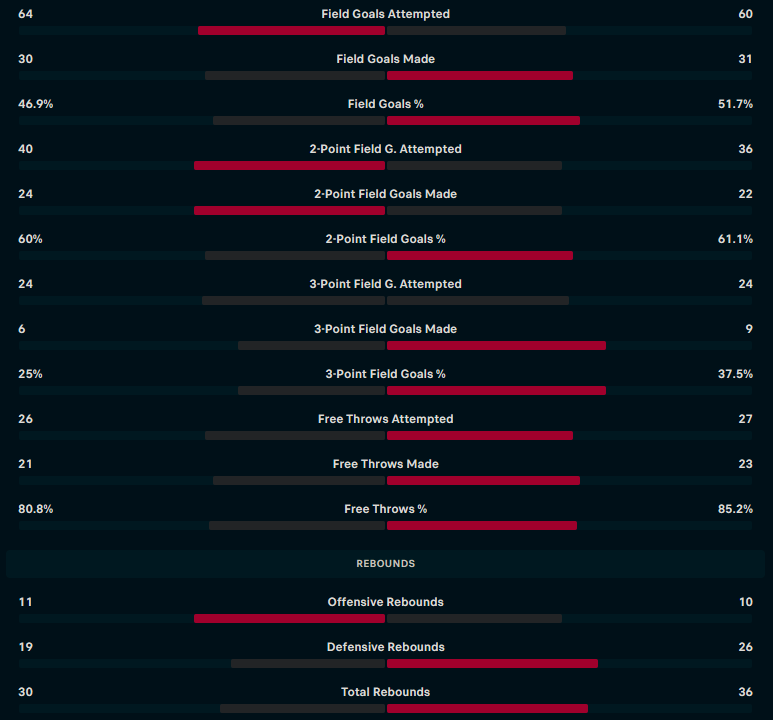
The same numbers on the match
Get match by ID
carries the same per team metrics in its
statistics block. Use this route when statistics are all you need.
Parameters
| Parameter | Type | Description |
|---|---|---|
matchIdrequired
|
numberpath | Requested statistics for given match id |
Request
curl --request GET \
  --url 'https://basketball.highlightly.net/statistics/{matchId}' \
  --header 'x-rapidapi-key: YOUR_API_KEY'
const response = await fetch('https://basketball.highlightly.net/statistics/{matchId}', {
headers: {
'x-rapidapi-key': process.env.HIGHLIGHTLY_API_KEY
}
})
if (!response.ok) {
throw new Error(`Highlightly responded ${response.status}`)
}
const data = await response.json()import os
import requests
response = requests.get(
'https://basketball.highlightly.net/statistics/{matchId}',
headers={
'x-rapidapi-key': os.environ['HIGHLIGHTLY_API_KEY'],
},
timeout=10,
)
response.raise_for_status()
data = response.json()Response
teamBasketballTeamResponserequired3 fields
idnumberrequired
logostring
namestringrequired
statisticsBasketballMatchStatisticsResponseItem[]required2 fields
valuenumberrequired
displayNamestringrequired
Example response
[
  {
    "team": {
      "id": 7592,
      "logo": "https://example.com/logos/team/7592.png",
      "name": "Adelaide"
    },
    "statistics": [
      {
        "value": 30,
        "displayName": "Field Goals"
      }
    ]
  }
]
Values are the examples declared in the OpenAPI spec, not a captured live response.
Errors
| Status | Description |
|---|---|
400 |
Bad request descriptive error. |
404 |
Match statistics not found |
500 |
Internal server error. |