How to Build an MLB Player Stats Dashboard
Learn how to build an MLB player stats dashboard using the Highlightly Baseball API. Access batting, pitching, and per-season statistics for MLB and NCAA players.
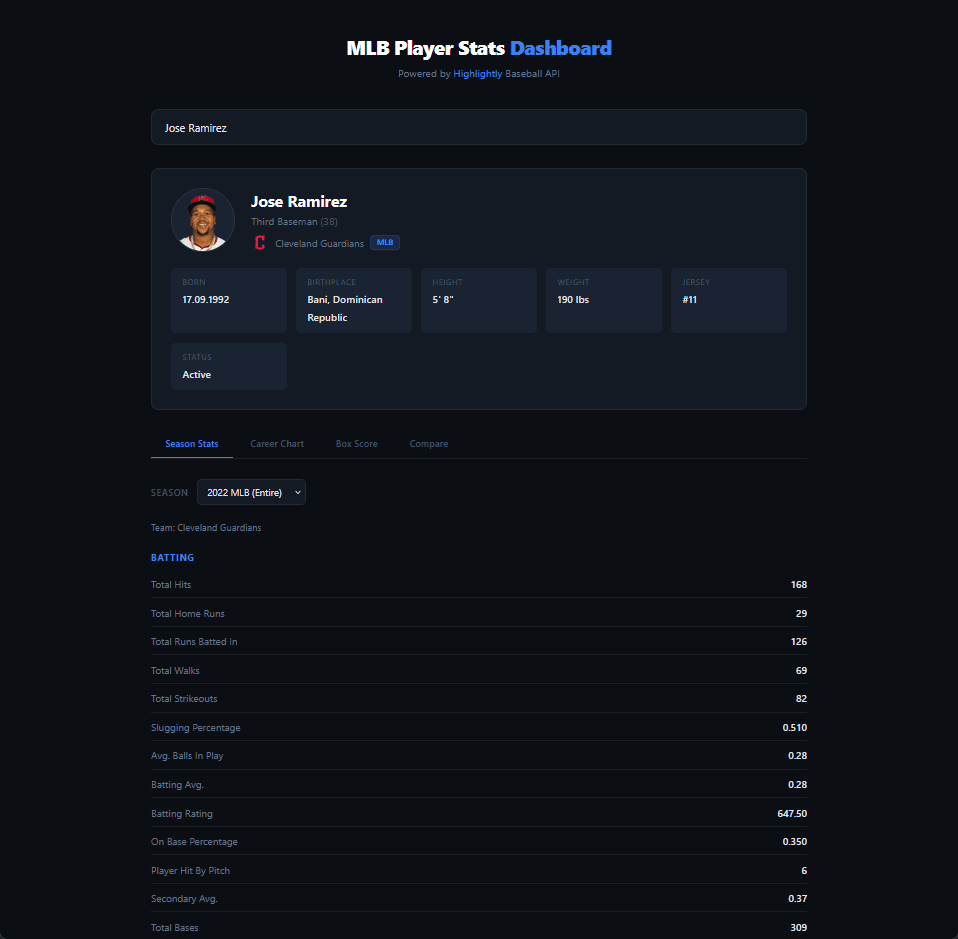
Baseball has always been a sport driven by numbers. From batting averages to earned run averages, statistics tell the story behind every player on the field. If you've ever wanted to create your own player stats dashboard, you're in the right place.
In this tutorial, we're going to walk through building an MLB player stats dashboard from scratch using the Highlightly Baseball API. By the end, you'll have a working application that can search for any MLB or NCAA player, display their profile, break down their batting and pitching stats season by season, and even compare two players side by side.
No advanced experience is required. If you can write a basic fetch request and render some HTML, you're good to go.
Prerequisites
Let's get the boring but important stuff out of the way first.
You'll need an API key from Highlightly. Head over to the login page and create an account, or sign up through RapidAPI if you prefer that platform. Both give you access to the same data, but the main difference is that Highlightly's direct platform offers custom plans and long-term discounts that RapidAPI doesn't.
Once you have your key, every API request needs this header:
x-rapidapi-key: YOUR_API_KEY
If you're going through RapidAPI, you'll also need:
x-rapidapi-host: mlb-college-baseball-api.p.rapidapi.com
The base URL for all requests through Highlightly is https://baseball.highlightly.net. Through RapidAPI, it's https://mlb-college-baseball-api.p.rapidapi.com.
Every API response includes
x-ratelimit-requests-remaining in its
headers. This tells you how many requests you have left before hitting
your daily limit. It's a good habit to log this during development, so
you don't burn through your quota while testing.
For the project itself, you can use whatever frontend framework you like. The code examples in this tutorial use vanilla JavaScript to keep things framework-agnostic. However, everything can be translated directly to React, Vue, Svelte, or anything else you're comfortable with.
Searching for Players and Displaying Profiles
The first thing any stats dashboard needs is a way to find players. The Baseball API gives us two endpoints for this:
- search across all players
- pull up the full profile for a specific player
Let's start with the search. The
GET /players endpoint accepts a
name query parameter, along with
limit and
offset for pagination:
          const API_BASE = "https://baseball.highlightly.net";
const API_KEY = "YOUR_API_KEY";

async function searchPlayers(name) {
  const response = await fetch(
    `${API_BASE}/players?name=${encodeURIComponent(name)}&limit=10`,
    {
      headers: { "x-rapidapi-key": API_KEY }
    }
  );

  const result = await response.json();

  return result.data;
}
This returns a paginated list of matching players. Each result
includes an id,
fullName, and a
logo URL (the player's headshot image
when available). A nice touch here is adding a debounce to your search
input so you're not firing off a request on every single keystroke.
Waiting 300–400ms after the user stops typing is usually the sweet
spot.
Once the user picks a player from the search results, we can fetch
their full profile using
GET /players/{id}:
          async function getPlayerProfile(playerId) {
  const response = await fetch(
    `${API_BASE}/players/${playerId}`,
    {
      headers: { "x-rapidapi-key": API_KEY }
    }
  );

  const data = await response.json();

  // Single player object
  return data[0];
}
The profile response is rich with information. Here's what you get
back inside the profile object and
how you might render it:
          function renderPlayerCard(player) {
  const { profile } = player;

  return `
    <div class="player-card">
      <img src="${player.logo}" alt="${player.fullName}" />
      <h2>${profile.fullName}</h2>
      <p class="position">
        ${profile.position.main}
        ${profile.position.abbreviation
          ? `(${profile.position.abbreviation})`
          : ""}
      </p>
      <ul>
        <li><strong>Team:</strong> ${profile.team.displayName}</li>
        <li><strong>Born:</strong> ${profile.birthDate} — ${profile.birthPlace}</li>
        <li><strong>Height:</strong> ${profile.height}</li>
        <li><strong>Weight:</strong> ${profile.weight}</li>
        <li><strong>Jersey:</strong> #${profile.jersey}</li>
        <li><strong>Status:</strong> ${profile.isActive ? "Active" : "Inactive"}</li>
      </ul>
    </div>
  `;
}
The team object nested inside the
profile also includes the team's
logo URL and
league field (either "MLB" or
"NCAA"), so you can display the team badge right alongside the
player's info. It's a small detail that makes the dashboard feel
polished.
Batting and Pitching Statistics
Now for the part everyone's really here for. The
GET /players/{id}/statistics
endpoint returns a player's performance data broken down by season:
          async function getPlayerStats(playerId) {
  const response = await fetch(
    `${API_BASE}/players/${playerId}/statistics`,
    {
      headers: { "x-rapidapi-key": API_KEY }
    }
  );

  const data = await response.json();

  return data[0];
}
The response organises stats inside a
perSeason array. Each entry
represents one season and includes the league, season year, associated
team(s), and a seasonBreakdown field
that's either "Entire" (regular
season plus post-season combined) or
"Season" (regular season only).
The stats themselves live in a
stats array where each item has a
name,
value, and
category, where category is either
"Batting" or
"Pitching". This is the key
distinction you'll use to decide which table to show.
Here's how to separate and render them:
          function renderSeasonStats(seasonEntry) {
  const battingStats = seasonEntry.stats.filter(
    (s) => s.category === "Batting"
  );
  const pitchingStats = seasonEntry.stats.filter(
    (s) => s.category === "Pitching"
  );

  let html = `
    <h3>
      ${seasonEntry.season} ${seasonEntry.league}
      <span class="breakdown">(${seasonEntry.seasonBreakdown})</span>
    </h3>
  `;

  if (battingStats.length > 0) {
    html += `<h4>Batting</h4><table><tr>`;
    battingStats.forEach((s) => {
      html += `<th>${s.name}</th>`;
    });
    html += `</tr><tr>`;
    battingStats.forEach((s) => {
      html += `<td>${s.value}</td>`;
    });
    html += `</tr></table>`;
  }

  if (pitchingStats.length > 0) {
    html += `<h4>Pitching</h4><table><tr>`;
    pitchingStats.forEach((s) => {
      html += `<th>${s.name}</th>`;
    });
    html += `</tr><tr>`;
    pitchingStats.forEach((s) => {
      html += `<td>${s.value}</td>`;
    });
    html += `</tr></table>`;
  }

  return html;
}
For batters, the most important stats to surface prominently are At-Bats (AB), Hits (H), Home Runs (HR), Runs Batted In (RBI), Batting Average (AVG), On-Base Percentage (OBP), and Slugging Percentage (SLG). For pitchers, prioritise Innings Pitched (IP), Strikeouts (SO), Earned Run Average (ERA), Walks Allowed (BB), and Total Pitches Thrown.
A nice UX pattern is to add a dropdown or toggle that lets users
switch between the
"Entire" and
"Season" breakdowns. Most casual fans
want the full picture, but analytically-minded users will appreciate
being able to isolate regular season performance from post-season.
Visualising Career Trends
A table of numbers is useful. A chart that shows how those numbers have changed over a player's career is compelling.
Since the perSeason array gives us
data across multiple years, we can map it directly to a time-series
chart. Let's say we want to plot home runs per season for a batter:
          function prepareChartData(playerStats) {
  return playerStats.perSeason
    .filter((s) => s.seasonBreakdown === "Season") // Regular season only
    .map((season) => {
      const hr = season.stats.find(
        (s) => s.name === "Home Runs" && s.category === "Batting"
      );
      return {
        season: season.season,
        team: season.teams?.[0]?.displayName || "Unknown",
        homeRuns: hr ? hr.value : 0
      };
    })
    .sort((a, b) => a.season - b.season);
}
If you're using a charting library like Recharts (great for React) or Chart.js (works everywhere), you can feed this data straight in. Here's a quick Chart.js example:
          function renderCareerChart(chartData, canvasId) {
  const ctx = document.getElementById(canvasId).getContext("2d");

  new Chart(ctx, {
    type: "bar",
    data: {
      labels: chartData.map((d) => `${d.season}`),
      datasets: [
        {
          label: "Home Runs",
          data: chartData.map((d) => d.homeRuns),
          backgroundColor: "#1d4ed8"
        }
      ]
    },
    options: {
      responsive: true,
      plugins: {
        tooltip: {
          callbacks: {
            afterLabel: (context) =>
              `Team: ${chartData[context.dataIndex].team}`
          }
        }
      }
    }
  });
}
You can easily extend this pattern to chart ERA over time for
pitchers, or create a multi-line chart that overlays batting average
and slugging percentage. The data is all there in the same
perSeason array. It's just a matter
of picking which stat names to extract.
One thing to keep in mind: each season entry can reference multiple
teams if a player was traded mid-season. The
teams array in the response handles
this, so your chart tooltips should account for that possibility.
Match-Day Performance with Box Scores
Career stats tell the macro story, but sometimes you want to zoom in
on a single game. The
GET /box-scores/{matchId} endpoint
gives you per-player performance data for a specific match.
The response structure is an array of two objects where each contains
the team info and a
boxScores array listing every player
and their individual stats:
          async function getBoxScore(matchId) {
  const response = await fetch(
    `${API_BASE}/box-scores/${matchId}`,
    {
      headers: { "x-rapidapi-key": API_KEY }
    }
  );

  // Returns [{ team: {...}, boxScores: [...] }, { team: {...}, boxScores: [...] }]
  return await response.json();
}
Each player in the box score has a
statistics array following the same
pattern: objects with name,
group (either
"Batting" or
"Pitching"), and
value. So the rendering logic you
already built for season stats applies here too.
To make this useful in a dashboard context, you'll want to pair it
with the GET /matches/{matchId}
endpoint, which gives you the full match context that includes the
opposing team, final score per inning, venue, weather forecast, and
even the umpires. This lets you build a game performance card that
reads something like "vs. New York Yankees at Yankee Stadium - 2 for
4, 1 HR, 3 RBI" alongside the final line score.
Here's how you might pull that together:
          async function getRecentGameContext(matchId, playerId) {
  const [boxScoreData, matchData] = await Promise.all([
    getBoxScore(matchId),
    fetch(`${API_BASE}/matches/${matchId}`, {
      headers: { "x-rapidapi-key": API_KEY }
    }).then((res) => res.json())
  ]);

  // Find which team the player belongs to
  const allPlayers = [
    ...boxScoreData[0].boxScores.map((p) => ({
      ...p,
      teamName: boxScoreData[0].team.name
    })),
    ...boxScoreData[1].boxScores.map((p) => ({
      ...p,
      teamName: boxScoreData[1].team.name
    }))
  ];

  const playerBox = allPlayers.find((p) => p.player.id === playerId);
  const match = matchData[0];

  return { playerBox, match };
}
This gives you everything needed to render a rich game card. The match
data even includes
venue (city, stadium name, state) and
forecast (weather status and
temperature), which are great details to include if you want to go the
extra mile.
Comparing Two Players Side by Side
A side-by-side comparison is one of those features that takes a dashboard from "useful" to "share-worthy." Fantasy baseball drafts, trade debates, MVP discussions. People love putting two players next to each other.
The good news is you've already built all the pieces. You just need to run the search and stats logic twice and stitch the results together:
          async function comparePlayers(playerIdA, playerIdB, season) {
  const [statsA, statsB] = await Promise.all([
    getPlayerStats(playerIdA),
    getPlayerStats(playerIdB)
  ]);

  // Find the requested season for each player
  const seasonA = statsA.perSeason.find(
    (s) => s.season === season && s.seasonBreakdown === "Season"
  );
  const seasonB = statsB.perSeason.find(
    (s) => s.season === season && s.seasonBreakdown === "Season"
  );

  // Build a unified list of stat names
  const allStatNames = [
    ...new Set([
      ...(seasonA?.stats || []).map((s) => s.name),
      ...(seasonB?.stats || []).map((s) => s.name)
    ])
  ];

  return allStatNames.map((name) => {
    const valA = seasonA?.stats.find((s) => s.name === name)?.value ?? "—";
    const valB = seasonB?.stats.find((s) => s.name === name)?.value ?? "—";
    return { stat: name, playerA: valA, playerB: valB };
  });
}
When rendering the comparison table, a simple but effective visual touch is to highlight the leading value in each row. A green shade or bold text on whichever number is better (higher for hits, lower for ERA) immediately draws the eye to who has the edge. Just keep in mind that "better" depends on the stat. More strikeouts is good for a pitcher but bad for a batter, so you'll want a small lookup that knows which direction is favourable for each metric.
Here's a straightforward way to handle that:
          // Stats where a LOWER value is better
const LOWER_IS_BETTER = [
  "Earned Run Average",
  "Total Strikeouts", // batting context
  "Hits Allowed",
  "Runs Allowed",
  "Total Earned Runs",
  "Total Walks Allowed",
  "Home Runs Allowed"
];

function getLeader(statName, valA, valB, category) {
  if (valA === "—" || valB === "—") return null;

  const lowerBetter =
    LOWER_IS_BETTER.includes(statName) ||
    (statName === "Total Strikeouts" && category === "Batting");

  if (lowerBetter) return valA < valB ? "A" : valB < valA ? "B" : null;
  return valA > valB ? "A" : valB > valA ? "B" : null;
}
Handling Errors and Edge Cases
Before you ship anything, there are a few gotchas worth addressing.
API errors follow a straightforward pattern. A
400 response means something was
wrong with your request, usually a missing or invalid parameter. A
500 means something went wrong on the
server side. In both cases, wrap your fetch calls in try-catch blocks
and show the user a friendly fallback message rather than a blank
screen.
          async function safeFetch(url) {
  try {
    const response = await fetch(url, {
      headers: { "x-rapidapi-key": API_KEY }
    });
    if (!response.ok) {
      console.error(`API error: ${response.status}`);

      return null;
    }

    return await response.json();
  } catch (error) {
    console.error("Network error:", error);
    return null;
  }
}
Two-way players are a real consideration in modern baseball. A
player like Shohei Ohtani will have both batting and pitching stats in
the same season entry. Your dashboard should render both tables when
they're present rather than assuming it's one or the other. The
filtering logic we wrote earlier already handles this. If both
battingStats and
pitchingStats arrays have entries,
both sections render.
Missing data can happen for a few reasons. A player might not have stats for a given season (rookie, injured, or just hasn't played yet). Some NCAA players have sparser data than MLB veterans. Always check for empty arrays and null values before trying to render, and show a "No stats available for this season" message rather than crashing.
NCAA vs MLB responses follow the same structure, so you don't
need separate rendering logic. The main differences are cosmetic. The
league field will say "NCAA" instead
of "MLB", and team names use college display names (like "Florida
State") rather than city-based names. Your UI should work seamlessly
across both.
Putting It All Together
Let's step back and look at how all these pieces connect into a cohesive application.
The architecture is simple. A search bar at the top feeds into a player profile card, which feeds into tabbed content areas for season stats, career charts, and recent game box scores. A second search slot enables the comparison view.
Here's a suggested folder structure:
          mlb-dashboard/
├── index.html
├── styles.css
├── js/
│   ├── api.js            # All fetch functions (search, profile, stats, box scores)
│   ├── playerCard.js     # Profile rendering
│   ├── statsTable.js     # Season stats tables (batting & pitching)
│   ├── careerChart.js    # Chart.js career visualisation
│   ├── boxScore.js       # Match-day performance card
│   ├── comparison.js     # Side-by-side comparison logic & rendering
│   └── app.js            # Main app controller, event listeners, routing
└── assets/
    └── placeholder.png   # Fallback player image
To get started, a sample GitHub project can be found here.
A few performance tips to keep things snappy. First, cache player
profiles and stats after the initial fetch. If a user clicks between
tabs, there's no reason to re-request data you already have. A simple
in-memory object keyed by player ID does the job. Second, use the
limit parameter wisely. When
searching players, limit=10 is plenty
for a dropdown. When pulling stats, the default response includes
everything, so you won't need pagination there. Third, watch your
remaining API requests via the
x-ratelimit-requests-remaining
header and consider showing a subtle indicator if the user is burning
through calls quickly during a development session.
And don't forget internal linking. If you're building a broader sports
platform, the same Highlightly account gives you access to match
schedules (GET /matches), league
standings (GET /standings),
team-level statistics (GET /teams/statistics/{id}), and even video highlights (GET /highlights). Each of those could be a new tab or page that deepens the user
experience.
What's Next
You've now got a working MLB player stats dashboard that covers player search and profiles, detailed batting and pitching breakdowns, career trend charts, single-game box score performance, and head-to-head player comparisons.
From here, there are plenty of directions to take it. You could add
lineup data using the
GET /lineups/{matchId} endpoint to
show starting rosters before games. You could pull in team-level stats
to build a team analytics section. Or you could integrate highlights
to let users watch key moments from a player's recent games right
inside the dashboard.
The full Baseball API documentation covers all 15+ endpoints with detailed response schemas and example payloads. If you're looking to expand beyond baseball, Highlightly also covers NBA, NFL, NHL, football, cricket, and several other sports under the same Sports API.
If you're still deciding which API is the right fit for your project, check out our Best Sport APIs in 2026 comparison. And if you're also working with basketball data, take a look at Building an NBA and NCAA Player App with a Single API since the patterns overlap more than you'd expect.
Happy building.