How to Build a Live Cricket Score App with a Free Cricket API
Build a live cricket score app using Highlightly's free Cricket API. This tutorial covers live matches and scorecards with working JavaScript and Python examples.
Cricket is one of the most followed sports in the world. Tournaments like the IPL, T20 World Cup and Big Bash pull in millions of fans every season. That audience creates demand for apps, widgets and dashboards that show live scores and match data. When someone wants to build an app, they will need a reliable API.
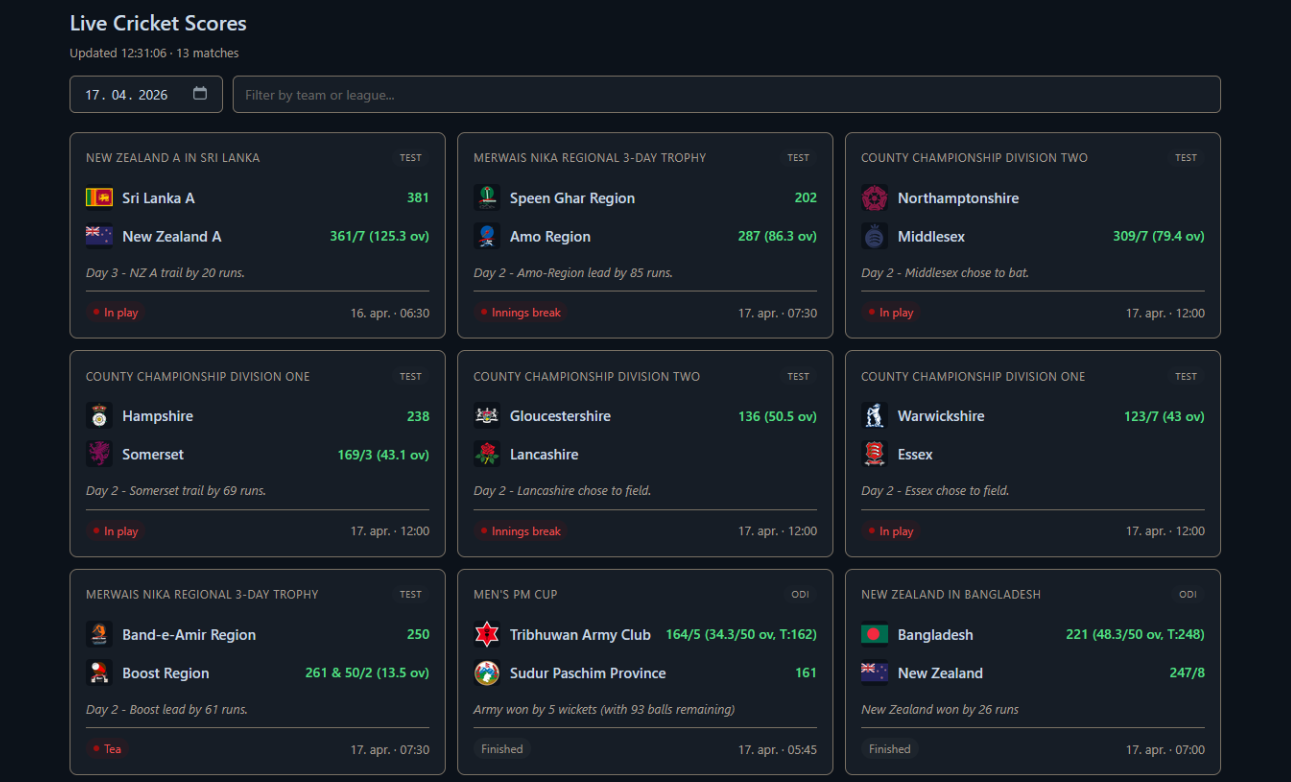
In this tutorial, we'll build a live cricket score app using the Highlightly Cricket API. It displays scorecards with team logos, format badges and match state indicators. Users can browse any date, filter by team or league. The app refreshes automatically and will pause when the tab is hidden.
We'll also cover a Python CLI for server-side use with date selection, filtering and compact output. If you can write a basic fetch request and render some HTML, the tutorial shouldn't be a problem.
Prerequisites
Let's cover the prerequisites.
You'll need an API key from Highlightly. Head over to the login page and create an account, or sign up through RapidAPI if you prefer that platform. Both give you access to the same data, but Highlightly's direct platform offers custom plans and long-term discounts that RapidAPI doesn't. Accounts do not sync across platforms.
Once you have your key, every API request will need the following header:
x-rapidapi-key: YOUR_API_KEYThis header works on both platforms. If you're using RapidAPI, you'll also need:
x-rapidapi-host: cricket-highlights-api.p.rapidapi.comThe base URL for all requests through Highlightly is https://cricket.highlightly.net. Through RapidAPI, it's https://cricket-highlights-api.p.rapidapi.com.
Every API response includes
x-ratelimit-requests-remaining
in the headers. This will tell you how many requests you have left
before hitting your daily limit. It's a good habit to log this
during development, so you don't burn through your quota while
testing.
The code examples in this tutorial use vanilla JavaScript. Everything can be translated directly to React, Vue, Svelte or anything else you're comfortable with.
Building a Live Dashboard
Before jumping into the code, it's worth covering what 100 requests per day is actually enough for. With smart caching and tab-hidden polling, this quota will support a surprising range of projects:
- a live score widget embedded on a blog or portfolio site
- a daily IPL digest that runs once in the morning and once at night
- a Telegram or Discord bot that posts score updates to a group
- a scorecard page on a cricket news site that refreshes during matches
Coverage includes IPL, BBL, PSL, CPL, SA20, The Hundred, County Championship and international matches across Test, ODI and T20 formats.
Understanding the API Response
Before writing any render-related code, we need to understand what
the
GET /matches endpoint returns. Each
match object contains the teams, league, format, and a
state object with scores and match
progress. Here is a trimmed example from a real response:
{
  "format": "T20",
  "startTime": "2026-04-17T14:00:00.000Z",
  "homeTeam": {
    "name": "Gujarat Titans",
    "abbreviation": "GT",
    "logo": "https://highlightly.net/cricket/images/teams/45457057.png"
  },
  "awayTeam": {
    "name": "Kolkata Knight Riders",
    "abbreviation": "KKR",
    "logo": "https://highlightly.net/cricket/images/teams/11759127.png"
  },
  "league": { "name": "IPL", "season": 2026 },
  "state": {
    "description": "Finished",
    "report": "GT won by 5 wickets (with 2 balls remaining)",
    "teams": {
      "home": { "score": "181/5", "info": "19.4/20 ov, T:181" },
      "away": { "score": "180", "info": null }
    }
  }
}
Scores live inside
state.teams.home and
state.teams.away. The
score field holds the runs and
wickets. The info field shows overs
and target when relevant. For Test matches with multiple innings,
the score can look like
"261 & 8/1". If a team hasn't
batted yet, both fields are null.
The state.description field tells
you the match status. The
state.report field gives a
human-readable result or day summary.
Project Structure
To keep everything simple and tidy, we will split the app into
multiple modules. If you decide later that you want to render with
React instead of plain DOM, only
render.js needs to change.
live-score-app/
├── index.html       # Markup, date picker, search bar
├── styles.css       # Styling
├── config.js        # API key and configuration
├── api.js           # Highlightly API client
├── render.js        # DOM rendering, filtering, sorting
└── app.js           # Entry point, refresh loop, date/search wiring
The HTML Shell
The HTML file defines a date picker and search input above the score grid. The date picker lets users browse historical matches. The search field filters results client-side without using any extra API calls.
<!DOCTYPE html>
<html lang="en">
<head>
  <meta charset="UTF-8" />
  <meta name="viewport" content="width=device-width, initial-scale=1" />
  <meta name="color-scheme" content="dark" />
  <title>Live Cricket Scores</title>
  <link rel="stylesheet" href="styles.css" />
</head>
<body>
  <header>
    <h1>Live Cricket Scores</h1>
    <p id="status" class="status">Loading...</p>
    <div class="controls">
      <input type="date" id="date-picker" class="date-picker"
             aria-label="Select match date" />
      <input type="text" id="search" class="search"
             placeholder="Filter by team or league..."
             aria-label="Filter matches" />
    </div>
  </header>

  <main>
    <div id="scores" class="grid" aria-live="polite"></div>
  </main>

  <script type="module" src="app.js"></script>
</body>
</html>
The color-scheme meta tag tells the
browser to render scrollbars and form controls in dark mode. The
aria-live="polite"
attribute announces score updates to screen readers without
interrupting.
Configuration
// config.js
export const config = {
  apiKey: "YOUR_API_KEY",
  apiBase: "https://cricket.highlightly.net",
  refreshMs: 60_000,
  requestTimeoutMs: 10_000,
  maxMatchesPerPage: 50,
};
Never commit a real API key to a public repository. In production, call the Highlightly API from your backend and expose a thin proxy to the browser so the key stays on the server.
Building the API Client
The API module handles authentication, timeouts and errors in one
place. The rest of the app just calls
fetchMatches() and gets back an
array.
// api.js
import { config } from "./config.js";

function buildUrl(path, params = {}) {
  const url = new URL(config.apiBase + path);
  for (const [key, value] of Object.entries(params)) {
    if (value !== undefined && value !== null && value !== "") {
      url.searchParams.set(key, value);
    }
  }
  return url.toString();
}

async function request(path, params = {}) {
  const url = buildUrl(path, params);

  const controller = new AbortController();
  const timeout = setTimeout(
    () => controller.abort(),
    config.requestTimeoutMs
  );

  try {
    const response = await fetch(url, {
      headers: { "x-rapidapi-key": config.apiKey },
      signal: controller.signal,
    });

    if (!response.ok) {
      throw new Error(
        `Highlightly request failed (${response.status}): ${response.statusText}`
      );
    }

    const remaining = response.headers.get("x-ratelimit-requests-remaining");
    if (remaining !== null) {
      console.debug(`Requests remaining today: ${remaining}`);
    }

    return await response.json();
  } catch (error) {
    if (error.name === "AbortError") {
      throw new Error("Request timed out. Check your connection and try again.");
    }
    throw error;
  } finally {
    clearTimeout(timeout);
  }
}

export async function fetchMatches({ date, leagueName, limit } = {}) {
  const body = await request("/matches", {
    date,
    leagueName,
    limit: limit ?? config.maxMatchesPerPage,
  });
  return body.data ?? [];
}

export function toIsoDate(dateObj) {
  const year = dateObj.getFullYear();
  const month = String(dateObj.getMonth() + 1).padStart(2, "0");
  const day = String(dateObj.getDate()).padStart(2, "0");
  return `${year}-${month}-${day}`;
}

export function todayIso() {
  return toIsoDate(new Date());
}
The AbortController provides a real
request timeout. The
todayIso helper builds the date in
the user's local timezone, avoiding the common
toISOString().slice(0, 10)
shortcut which uses UTC and silently breaks near midnight for users
ahead of UTC.
Rendering the Match Cards
The render module reads scores from
state.teams.home and
state.teams.away. Each team row
shows the logo, name, and score with overs and target info when
available. Match cards also display the format (TEST, T20, ODI), the
round, the match result report, and a state badge with local time.
// render.js (key sections)
function renderTeamRow(team, teamState) {
  const name = team?.name ?? "TBD";
  const logo = team?.logo ?? "";
  const score = teamState?.score ?? null;
  const info = teamState?.info ?? null;

  let scoreDisplay = "";
  if (score) {
    scoreDisplay = score;
    if (info) scoreDisplay += ` (${info})`;
  }

  return el("div", {
    className: "card__team",
    children: [
      logo
        ? el("img", { className: "card__team-logo", src: logo, alt: name })
        : null,
      el("span", { className: "card__team-name", children: [name] }),
      scoreDisplay
        ? el("span", { className: "card__team-score", children: [scoreDisplay] })
        : null,
    ],
  });
}
The function takes two arguments. The first one is the team object
(for name and logo), and the second one is the team state object
(for score and info). When both score and info are present, they
combine naturally:
181/5 (19.4/20 ov, T:181). For Test
matches with multiple innings, the API returns the score as a single
string like 261 & 8/1, which
displays correctly without any extra parsing. When a team hasn't
batted yet, score is null and no
score element is rendered.
Match states are classified into multiple categories for visual treatment. In play gets a red live badge. Stumps, Tea and Lunch get a yellow break badge with the pulsing dot.
function classifyState(description) {
  if (!description) return "other";
  const lower = description.toLowerCase();
  if (["in play", "live", "innings break"].includes(lower)) return "live";
  if (["stumps", "tea", "lunch", "dinner", "drinks"].includes(lower)) return "break";
  if (["finished", "abandoned", "no result"].includes(lower)) return "finished";
  if (["not started", "scheduled"].includes(lower)) return "upcoming";
  return "other";
}
The full match card includes the league name, format badge, round, both team rows, the result report (if available) and a footer with the state badge and local time converted from UTC.
Filtering and sorting are also handled client-side in the render module. The filter matches on team names, abbreviations, league name, format, country and round. Sorting places live matches first, then break states (Stumps, Tea), then upcoming, then finished.
export function filterMatches(matches, query) {
  if (!query || query.trim() === "") return matches;
  const terms = query.toLowerCase().trim().split(/\s+/);

  return matches.filter((match) => {
    const searchable = [
      match.homeTeam?.name,
      match.homeTeam?.abbreviation,
      match.awayTeam?.name,
      match.awayTeam?.abbreviation,
      match.league?.name,
      match.round,
      match.format,
      match.country?.name,
    ]
      .filter(Boolean)
      .join(" ")
      .toLowerCase();

    return terms.every((term) => searchable.includes(term));
  });
}
The search supports multi-word queries. Typing county test will match County Championship Test matches. Typing GT will match Gujarat Titans by abbreviation.
Date Selection, Search and Refresh Logic
The entry point wires the date picker, search bar and refresh loop together.
// app.js
import { fetchMatches, todayIso, toIsoDate } from "./api.js";
import {
  renderMatches, renderError, filterMatches, sortMatches,
} from "./render.js";
import { config } from "./config.js";

const statusEl = document.getElementById("status");
const scoresEl = document.getElementById("scores");
const datePickerEl = document.getElementById("date-picker");
const searchEl = document.getElementById("search");

let refreshTimer = null;
let cachedMatches = [];
let selectedDate = todayIso();

datePickerEl.value = selectedDate;

function applyFilter() {
  const sorted = sortMatches(cachedMatches);
  const filtered = filterMatches(sorted, searchEl.value);
  renderMatches(scoresEl, filtered);
}

async function refresh() {
  try {
    cachedMatches = await fetchMatches({ date: selectedDate });
    applyFilter();

    const timestamp = new Date().toLocaleTimeString();
    const count = cachedMatches.length;
    const label = count === 1 ? "match" : "matches";
    setStatus(`Updated ${timestamp} · ${count} ${label}`);
  } catch (error) {
    console.error("Refresh failed:", error);
    renderError(scoresEl, error.message);
  }
}

function startRefresh() {
  if (refreshTimer) return;
  if (selectedDate !== todayIso()) return;
  refreshTimer = setInterval(refresh, config.refreshMs);
}

datePickerEl.addEventListener("change", () => {
  const newDate = datePickerEl.value;
  if (!newDate || newDate === selectedDate) return;
  selectedDate = newDate;
  stopRefresh();
  refresh();
  startRefresh();
});

let searchDebounce = null;
searchEl.addEventListener("input", () => {
  clearTimeout(searchDebounce);
  searchDebounce = setTimeout(applyFilter, 200);
});

refresh();
startRefresh();
The date picker triggers a fresh API call when changed, but auto-refresh only runs when viewing today's matches. Historical dates don't change, so polling would waste quota.
The search input filters from cached data with a 200ms debounce time. No API calls are needed since the full match list is already in memory.
The
startRefresh() function guards
against stacking multiple intervals on rapid tab switches. The
visibilitychange handler (included
in the full source) pauses polling when the tab is hidden.
ES modules require HTTP. Run
python3 -m http.server 8000
from the project folder and open
http://localhost:8000.
A Python Companion Script
The same API works server-side. The Python project follows the same module structure with a typed API client, a formatting module and a CLI entry point.
python-scorecard/
├── main.py                  # CLI entry point
├── highlightly/
│   ├── __init__.py
│   ├── client.py            # API client
│   └── formatting.py        # Output formatting
└── requirements.txt
The API client is built as a frozen dataclass so it can't be mutated
after creation. It uses typed signatures and a custom exception
type, which makes it easy to tell whether a failure came from the
network or from the API itself. The
response.json() call is wrapped in
a try/except ValueError block to
catch non-JSON responses from proxies or gateways.
# highlightly/client.py
from __future__ import annotations

import logging
from dataclasses import dataclass
from datetime import date
from typing import Any

import requests

logger = logging.getLogger(__name__)


class HighlightlyError(Exception):
    """Raised when the Highlightly API returns an error."""


@dataclass(frozen=True)
class HighlightlyClient:
    api_key: str
    base_url: str = "https://cricket.highlightly.net"
    timeout_seconds: float = 10.0

    def _get(self, path: str, params: dict[str, Any]) -> dict[str, Any]:
        cleaned = {k: v for k, v in params.items() if v is not None}
        headers = {"x-rapidapi-key": self.api_key}

        try:
            response = requests.get(
                f"{self.base_url}{path}",
                params=cleaned,
                headers=headers,
                timeout=self.timeout_seconds,
            )
        except requests.Timeout as exc:
            raise HighlightlyError("Request timed out") from exc
        except requests.ConnectionError as exc:
            raise HighlightlyError("Could not reach Highlightly") from exc

        remaining = response.headers.get("x-ratelimit-requests-remaining")
        if remaining is not None:
            logger.debug("Requests remaining today: %s", remaining)

        if not response.ok:
            raise HighlightlyError(
                f"API returned {response.status_code}: {response.text[:200]}"
            )

        try:
            return response.json()
        except ValueError as exc:
            raise HighlightlyError(
                f"Invalid JSON in response: {response.text[:200]}"
            ) from exc

    def fetch_matches(
        self,
        match_date: date,
        league_name: str | None = None,
        limit: int = 50,
    ) -> list[dict[str, Any]]:
        body = self._get(
            "/matches",
            {
                "date": match_date.isoformat(),
                "leagueName": league_name,
                "limit": limit,
            },
        )
        return body.get("data", [])
The formatting module reads scores from
state.teams, converts
startTime to local time, and
displays the match format alongside the league name. Break states
like Stumps and Tea get distinct markers.
The CLI supports four flags beyond the basics.
--date accepts YYYY-MM-DD or
shortcuts like today, yesterday and tomorrow.
--filter searches results
client-side by team, league, abbreviation, format or country.
--compact prints one line per match
using team abbreviations.
--league filters server-side before
the data is returned.
# main.py (key sections)
def parse_date(value: str) -> date:
    shortcuts = {
        "today": date.today(),
        "yesterday": date.today() - timedelta(days=1),
        "tomorrow": date.today() + timedelta(days=1),
    }
    if value.lower() in shortcuts:
        return shortcuts[value.lower()]
    return date.fromisoformat(value)


def main(argv=None):
    # ... argument parsing ...

    matches = client.fetch_matches(args.date, league_name=args.league)

    if args.query:
        matches = [m for m in matches if matches_contain(m, args.query)]

    if args.compact:
        for match in matches:
            print(format_match_compact(match))
    else:
        for match in matches:
            print(format_match(match))
To run the script on Linux or macOS, type the following commands:
pip install -r requirements.txt
export HIGHLIGHTLY_API_KEY=your_key_here
echo $HIGHLIGHTLY_API_KEY
python main.py --league "Indian Premier League"
As for Windows via CMD:
pip install -r requirements.txt
set HIGHLIGHTLY_API_KEY=your_key_here
echo %HIGHLIGHTLY_API_KEY%
python main.py --league "Indian Premier League"
Or on Windows via PowerShell:
pip install -r requirements.txt
$env:HIGHLIGHTLY_API_KEY="your_key_here"
echo $env:HIGHLIGHTLY_API_KEY
python main.py --league "Indian Premier League"
The echo line should print your API
key back. If it prints an empty line or the variable name itself,
the key wasn't set correctly.
Sample detailed output:
Matches for 2026-04-17 (13 found):

IPL · T20
  Gujarat Titans: 181/5 (19.4/20 ov, T:181)
  Kolkata Knight Riders: 180
  → GT won by 5 wickets (with 2 balls remaining)
  ✓ Finished  17 Apr 14:00

County Championship Division Two · TEST
  Gloucestershire: 124/6 (44 ov)
  Lancashire
  → Day 1 - Lancashire chose to field.
  🟡 Stumps  17 Apr 10:00

Merwais Nika Regional 3-Day Trophy · TEST
  Band-e-Amir Region: 250
  Boost Region: 261 & 8/1 (2.3 ov)
  → Day 2 - Boost lead by 19 runs.
  🔴 LIVE  17 Apr 05:30
Sample compact output with
--compact:
GT 181/5  vs  KKR 180  [Finished] T20
GLOUC 124/6  vs  LANCS  [Stumps] TEST
BEAR 250  vs  BOOST 261 & 8/1  [In play] TEST
LQ 134  vs  QG 138/4  [Finished] T20
SL-A 381  vs  NZ-A 326/6  [Tea] TEST
Filter by format and date:
python main.py --date yesterday --filter "test" --compactHandling Rate Limits on the Free Tier
Every response includes
x-ratelimit-requests-remaining
in the headers. Both examples above log it at debug level.
Let's check what the best practices are to keep you under the 100
per day limit. Firstly, cache everything aggressively. A 60-second
cache on live match data is almost invisible and cuts requests by a
significant margin. Secondly, poll data smartly. The app only
auto-refreshes when viewing today's matches. Historical dates are
fetched once. The tab-hidden handler and double-interval guard
prevent quota waste from background polling. Thirdly, only request
the data that you actually need. Passing
leagueName filters server-side and
reduces payload size.
Switching to Pro Plan or Above
If your app has more than a handful of daily users, 100 requests per day will run out. If you need odds data for fantasy or prediction products, you will need to switch to a paid tier.
Pro plans start at $6.99 per month with up to 40% off on annual
billing through Highlightly. Upgrading does not change any code. The
same API key goes into
config.js and everything keeps
working with higher rate limits.
Wrapping Up
That covers the full build. You now have a live score app in JavaScript with date browsing, search and format-aware cards, plus a Python CLI with date selection, filtering and compact output.
A few ideas for what to build next. Start by showing head-to-head
records between two teams. Then add a comparison tool using player
stats. Finally, fetch detailed scorecards via
GET /matches/{id}.
The full Cricket API documentation covers every endpoint with response schemas and examples. If you're evaluating providers, our Best Cricket APIs in 2026 comparison breaks down the main options. Highlightly's All Sports API also covers football, NFL, NBA, NHL, MLB, rugby, volleyball, basketball and handball under a single key. The same patterns from this tutorial apply if you branch into other sports.