MLB, NCAA Baseball API | Highlightly (6.2.2)
Download OpenAPI specification:Download
Get ready for real time MLB and College Baseball match/player statistics, live scores, match predictions, live events, highlights, game recaps, fouls, and post-match interviews on a global scale. Integrate a wide spectrum of pre-match and live game odds into your projects for a complete sports data solution.
For feature requests, questions, private plans or business inquiries you can contact us at [email protected].
You can also contact us via RapidAPI by starting a discussion or by sending us a private message.
To start using our API services you will first need to create an account via Highlightly or RapidAPI. Both platforms offer you the ability to view the API analytics, manage billing settings, control API keys and much more. However, there are a few differences. RapidAPI does not include custom plans nor does it provide long term plan discounts.
Accounts are not synced across platforms.
Please ensure that your API key is not made public to prevent potential abuse. Your API key can be managed either through Highlightly or RapidAPI.
Highlightly API base url:
https://baseball.highlightly.net
RapidAPI API base url:
https://mlb-college-baseball-api.p.rapidapi.com
Each API request will be considered valid only if the following headers are present:
| Request Header | Value |
|---|---|
x-rapidapi-key |
Your Highlightly or RapidAPI API Key |
x-rapidapi-host |
mlb-college-baseball-api.p.rapidapi.com -
only needed for usage through RapidAPI
|
These headers are mandatory when requesting API data. They are not needed when requesting other resources such as logos or images.
Each API response will contain additional headers. The following three are considered the most important for developers:
| Response Header | Value |
|---|---|
x-ratelimit-requests-limit |
This is a static value indicating the number of requests the plan you are currently subscribed to allows you to make. |
x-ratelimit-requests-remaining |
The number of requests remaining (from your plan) before you reach the limit of requests your application is allowed to make. When this reaches zero, you will not be able to make any requests until your daily quota is reset. You can view these limits and quotas on the pricing page of the API in the API Hub. |
content-type |
Value will always be application/json. XML
format is not supported.
|
In the following sections we will guide you through all endpoints and functionalities the API has to offer.
Get all highlights
Refresh interval: Once a minute
Note: Certain highlights might be uploaded whilst the game is playing. Full game recaps tend to be uploaded anywhere from 1 to 48 hours after a match is finished.
Highlights represent the core of our API. They include various different kinds of clips ranging from real time live events such as insane plays, last minute scores to full game recaps, pre/post match interviews.
Currently we aggregate videos from many different sources. Depending on the source and verification process we divide the clips into two categories:
| Type | Description |
|---|---|
| VERIFIED |
Videos come from reputable sources that have been
thoroughly inspected. In most cases the clips are
from official authors who own the copyrights to the
video itself. The hosting platform can impose geo
restrictions or prevent direct embedding (highlights/geo-restrictions/{highlightId}
route can be used to check for potential
restrictions). Verified highlights are uploaded
anywhere from 1 to 48 hours of the match being
finished.
|
| UNVERIFIED | Highlights vary and might not have gone through the verification process or are considered user uploaded. Videos include a wide spectrum of topics such as last minute scores, memorable plays, game recaps, etc. Unverified highlights are considered more real time and might be uploaded even when the match is still being played. The lifetime of these clips vary and is dependant on the hosting platform. |
Each highlight has a title which describes
what the video is about. Certain entries will have a
description as well which is used to further
describe the associated clip. The
source field defines where the clip was
aggregated from (e.g. would be youtube,
twitter, reddit, espn, etc.).
For certain sources you will see additional information
being present in the channel field. By
utilising this information you can further narrow down
which videos you want to showcase. Highlights might also
have an embedUrl property which is used to
directly embed the videos into your website or mobile
application.
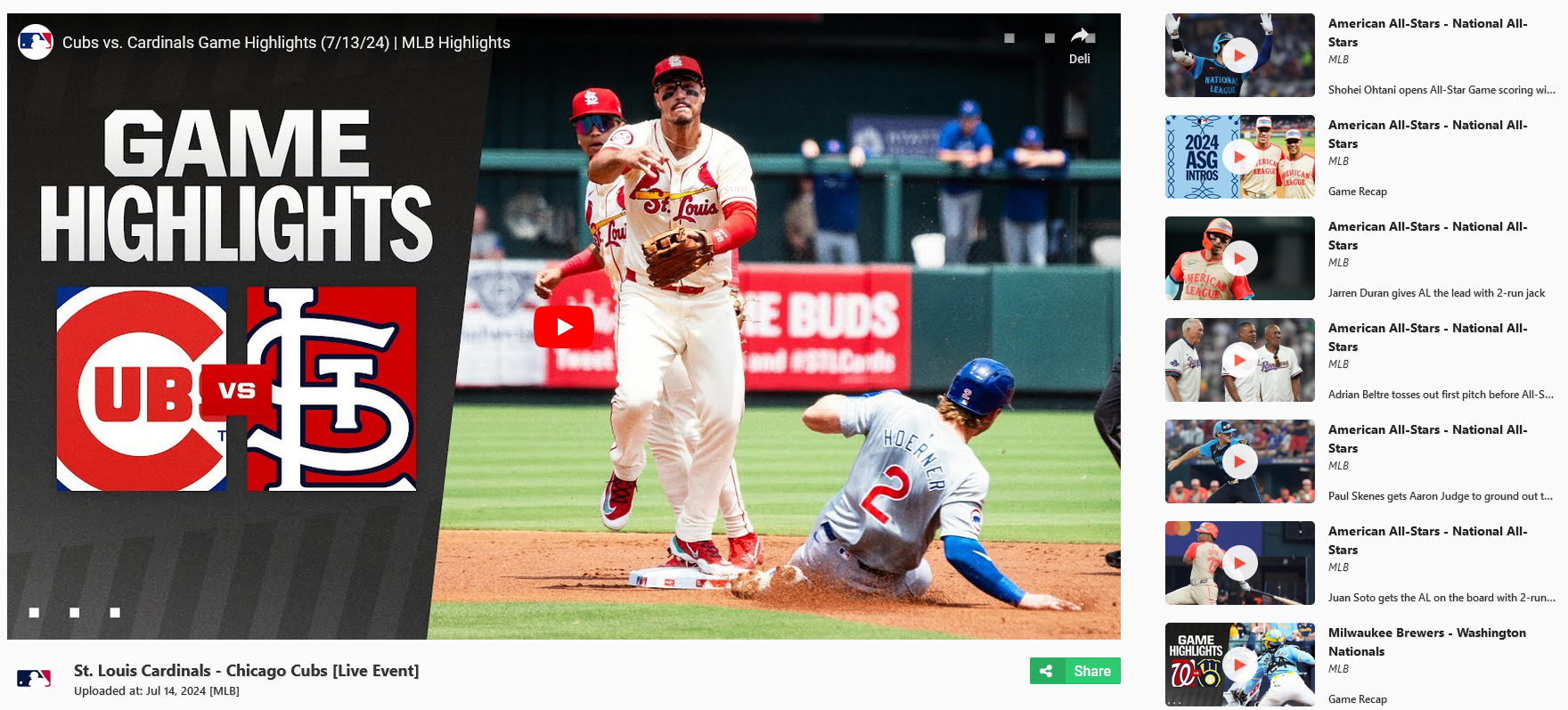
Below is an example of what you can aim to achieve with our highlights data:
Retrieve highlights
Retrieve a list of highlights based on the requested query parameters.
At least one primary query parameter needs to be specified
before you can retrieve the data (timezone,
limit, offset are considered
secondary).
You can specify the timezone field in
combination with the date query parameter to
get highlights relevant to your location.
There are two other important parameters. The
limit parameter defines what the number of
returned highlights will be. If the number of actual
highlights is above the limit value you can
make subsequent requests by increasing the
offset value.
Note: The Basic/Free plan might have certain restrictions in place. More information can be found here.
query Parameters
| leagueName |
string
Example:
leagueName=NCAA
|
| date |
string
Example:
date=2022-06-10
Date that follows the YYYY-MM-DD format. |
| timezone |
string
Default:
"Etc/UTC"
Example:
timezone=Europe/London
Valid timezone identifier. |
| season |
number
Example:
season=2022
|
| matchId |
number
Example:
matchId=343056
|
| homeTeamId |
number
Example:
homeTeamId=10291525
|
| awayTeamId |
number
Example:
awayTeamId=10291566
|
| homeTeamName |
string
Example:
homeTeamName=Pirates
|
| awayTeamName |
string
Example:
awayTeamName=Longhorns
|
| homeTeamAbbreviation |
string
Example:
homeTeamAbbreviation=ECU
|
| awayTeamAbbreviation |
string
Example:
awayTeamAbbreviation=TEX
|
| homeTeamDisplayName |
string
Example:
homeTeamDisplayName=East Carolina
|
| awayTeamDisplayName |
string
Example:
awayTeamDisplayName=Texas
|
| limit |
number
[ 0 .. 40 ]
Default:
40
Example:
limit=40
|
| offset |
number
>= 0
Default:
0
Example:
offset=0
|
header Parameters
|
x-rapidapi-host
required
|
string
mlb-college-baseball-api.p.rapidapi.com |
|
x-rapidapi-key
required
|
string
Rapid API Token |
Responses
Response samples
- 200
- 400
- 500
{
-
"data":
[
-
{
-
"id":
27,
-
"type":
"VERIFIED",
-
-
"title":
"NCAA: Bears vs
Patriots",
-
"description":
"Tom Poole sends one deep
to right to give Dallas
Baptist an insurance run
over Baylor.",
-
-
-
"match":
{
-
"id":
394,
-
"round":
"regular-season",
-
"date":
"2024-03-06T00:30:00.000Z",
-
"league":
"NCAA",
-
"season":
2024,
-
"awayTeam":
{
-
"id":
219,
-
-
"name":
"Bears",
-
"displayName":
"Baylor",
-
"abbreviation":
"BAY"
},
-
"homeTeam":
{
-
"id":
219,
-
-
"name":
"Bears",
-
"displayName":
"Baylor",
-
"abbreviation":
"BAY"
}
},
-
"channel":
"MLB",
-
"source":
"youtube"
}
],
-
"pagination":
{
-
"totalCount":
490,
-
"offset":
20,
-
"limit":
100
},
-
"plan":
{
-
"tier":
"BASIC",
-
"message":
"Some results might be hidden
with FREE tier. Check your API
coverage for more information:
https://rapidapi.com/highlightly-api-highlightly-api-default/api/sport-highlights-api/details"
}
}


Get geo restrictions for highlight
Refresh interval: Once an hour
Note: Endpoint is not available in the Basic/Free plan.
Geo restrictions are a plague that have been around for quite a while. They restrict access to online content based on the viewers geographical location. Trying to show restricted highlights to your users can greatly hinder the viewing experience.
Each highlight has a state property which
defines how the geo restrictions are applied.
| State | Description |
|---|---|
| No restricitons applied | Highlight has no restrictions applied and is available globally. |
| Allowed countries restriction |
Highlight is only available to users whose country
code is found in the
allowedCountries list.
|
| Blocked countries restriction |
Highlight is blocked to all users whose country code
is found in the blockedCountries list.
|
| Unknown restrictions | There is no guaranteed way to define all allowed or blocked countries. |
As presented before, certain highlights have an
embedUrl field which can be used to directly
embed the video into your website or application. The
embeddable field specifies whether this is
allowed or not.
path Parameters
|
id
required
|
number
Requested highlight id. |
header Parameters
|
x-rapidapi-host
required
|
string
mlb-college-baseball-api.p.rapidapi.com |
|
x-rapidapi-key
required
|
string
Rapid API Token |
Responses
Response samples
- 200
- 400
- 500
{
-
"state":
"Allowed countries restriction",
-
"allowedCountries":
[
-
"IT"
],
-
"blockedCountries":
[ ],
-
"embeddable":
true
}
Get highlight by id
Retrieve highlight information by specifying the highlight id path parameter.
Note: Used to check whether a highlight still exists or had its information updated.
path Parameters
|
id
required
|
number
Requested highlight id. |
header Parameters
|
x-rapidapi-host
required
|
string
mlb-college-baseball-api.p.rapidapi.com |
|
x-rapidapi-key
required
|
string
Rapid API Token |
Responses
Response samples
- 200
- 400
- 500
[
-
{
-
"id":
27,
-
"type":
"VERIFIED",
-
-
"title":
"NCAA: Bears vs Patriots",
-
"description":
"Tom Poole sends one deep to
right to give Dallas Baptist an
insurance run over
Baylor.",
-
-
-
"match":
{
-
"id":
394,
-
"round":
"regular-season",
-
"date":
"2024-03-06T00:30:00.000Z",
-
"league":
"NCAA",
-
"season":
2024,
-
"awayTeam":
{
-
"id":
219,
-
-
"name":
"Bears",
-
"displayName":
"Baylor",
-
"abbreviation":
"BAY"
},
-
"homeTeam":
{
-
"id":
219,
-
-
"name":
"Bears",
-
"displayName":
"Baylor",
-
"abbreviation":
"BAY"
}
},
-
"channel":
"MLB",
-
"source":
"youtube"
}
]
Get all matches
Refresh interval: Once a minute
Route returns only general match information. For additional match details check the
matches/{matchId}route.
Retrieve a list of matches based on the requested query parameters.
At least one primary query parameter needs to be specified
before you can retrieve the data (timezone,
limit, offset are considered
secondary).
You can specify the timezone field in
combination with the date query parameter to
get matches relevant to your location.
There are two other important parameters. The
limit parameter defines what the number of
returned matches will be. If the number of actual matches
is above the limit value you can make
subsequent requests by increasing the
offset value.
Matches have different possible states they can be in:
| State | Description |
|---|---|
| Finished | Match has been concluded. |
| Postponed | Match has been postponed due to certain circumstances that are preventing the game from being played. Event start time will be changed to a moment in the future. |
| Scheduled | Match has not been started yet. |
| Canceled | Game will not be played. |
| Abandoned | Considered "abandoned" when it is prematurely ended by the officials and can not be resumed or completed. In the future the game might be resumed from the exact point where it was halted. |
| In Progress | Game is currently in progress. |
| Half Time | Half time pause between first and second half. |
| Suspended | Match has already been in play but was suspended. In the future the game will resume from the exact point where it was halted. |
| Unknown | Unknown match coverage or state. |
| Rain Delay | Match has been delayed due to bad weather conditions. Will either be resumed or suspended. |
| Period End | Break time between periods. |
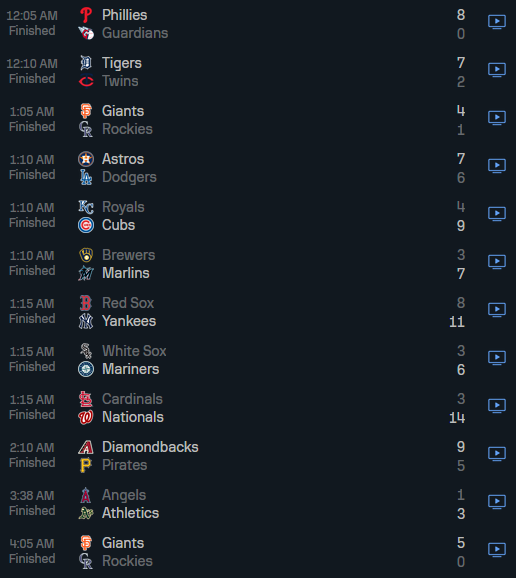
Below is an example of what you can aim to achieve with the matches endpoint:
query Parameters
| league |
string
Example:
league=MLB
|
| date |
string
Example:
date=2024-08-31
Date that follows the YYYY-MM-DD format. |
| timezone |
string
Default:
"Etc/UTC"
Example:
timezone=Europe/London
Valid timezone identifier. |
| season |
number
Example:
season=2024
|
| homeTeamId |
number
Example:
homeTeamId=10291199
|
| awayTeamId |
number
Example:
awayTeamId=10291203
|
| homeTeamName |
string
Example:
homeTeamName=Rangers
|
| awayTeamName |
string
Example:
awayTeamName=Athletics
|
| homeTeamAbbreviation |
string
Example:
homeTeamAbbreviation=TEX
|
| awayTeamAbbreviation |
string
Example:
awayTeamAbbreviation=OAK
|
| homeTeamDisplayName |
string
Example:
homeTeamDisplayName=Texas Rangers
|
| awayTeamDisplayName |
string
Example:
awayTeamDisplayName=Oakland Athletics
|
| limit |
number
[ 0 .. 100 ]
Default:
100
Example:
limit=100
|
| offset |
number
>= 0
Default:
0
Example:
offset=0
|
header Parameters
|
x-rapidapi-host
required
|
string
mlb-college-baseball-api.p.rapidapi.com |
|
x-rapidapi-key
required
|
string
Rapid API Token |
Responses
Response samples
- 200
- 400
- 500
{
-
"data":
[
-
{
-
"id":
394,
-
"round":
"regular-season",
-
"date":
"2024-03-06T00:30:00.000Z",
-
"league":
"NCAA",
-
"season":
2024,
-
"awayTeam":
{
-
"id":
219,
-
-
"name":
"Bears",
-
"displayName":
"Baylor",
-
"abbreviation":
"BAY"
},
-
"homeTeam":
{
-
"id":
219,
-
-
"name":
"Bears",
-
"displayName":
"Baylor",
-
"abbreviation":
"BAY"
},
-
"state":
{
-
"description":
"Finished",
-
"report":
"Final",
-
"score":
{
-
"home":
{
-
"hits":
4,
-
"errors":
2,
-
"innings":
[
-
0,
-
0,
-
1,
-
1,
-
0,
-
0,
-
1,
-
1,
-
1
]
},
-
"away":
{
-
"hits":
4,
-
"errors":
2,
-
"innings":
[
-
0,
-
0,
-
1,
-
1,
-
0,
-
0,
-
1,
-
1,
-
1
]
},
-
"current":
"5 - 8"
}
}
}
],
-
"pagination":
{
-
"totalCount":
490,
-
"offset":
20,
-
"limit":
100
},
-
"plan":
{
-
"tier":
"BASIC",
-
"message":
"Some results might be hidden
with FREE tier. Check your API
coverage for more information:
https://rapidapi.com/highlightly-api-highlightly-api-default/api/sport-highlights-api/details"
}
}
Get match by id
Retrieve detailed match information by specifying the match id path parameter.
Fetched data will have additional information about the
venue, weather forecast, match
stats, who the game's
referees are, each team's
rosters, and plays.
Note: Used to retrieve additional match information.
path Parameters
|
id
required
|
number
Requested match id. |
header Parameters
|
x-rapidapi-host
required
|
string
mlb-college-baseball-api.p.rapidapi.com |
|
x-rapidapi-key
required
|
string
Rapid API Token |
Responses
Response samples
- 200
- 400
- 500
[
-
{
-
"id":
58348,
-
"round":
"regular-season",
-
"date":
"2024-03-31T17:00:00.000Z",
-
"league":
"NCAA",
-
"season":
2024,
-
"awayTeam":
{
-
"id":
219,
-
-
"name":
"Bears",
-
"displayName":
"Baylor",
-
"abbreviation":
"BAY"
},
-
"homeTeam":
{
-
"id":
219,
-
-
"name":
"Bears",
-
"displayName":
"Baylor",
-
"abbreviation":
"BAY"
},
-
"state":
{
-
"description":
"Finished",
-
"report":
"Final",
-
"score":
{
-
"home":
{
-
"hits":
4,
-
"errors":
2,
-
"innings":
[
-
0,
-
0,
-
1,
-
1,
-
0,
-
0,
-
1,
-
1,
-
1
]
},
-
"away":
{
-
"hits":
4,
-
"errors":
2,
-
"innings":
[
-
0,
-
0,
-
1,
-
1,
-
0,
-
0,
-
1,
-
1,
-
1
]
},
-
"current":
"5 - 8"
}
},
-
"venue":
{
-
"city":
"Waco",
-
"name":
"Baylor Ballpark",
-
"state":
"Texas"
},
-
"stats":
[
-
{
-
"team":
{
-
"id":
10291185,
-
"name":
"Toronto Blue
Jays",
-
-
"statistics":
[
-
{
-
"name":
"Total
Strikeouts",
-
"value":
12,
-
"group":
"Batting"
}
]
}
}
],
-
"plays":
[
-
{
-
"type":
"Start
Inning",
-
"teamId":
229,
-
"description":
"Top of the 1st
inning",
-
"currentOuts":
0,
-
"period":
"Top 1st
Inning",
-
"pitch":
{
-
"type":
"CURVE",
-
"velocity":
78.2,
-
"ballsCount":
0,
-
"strikesCount":
0
},
-
"result":
{
-
"ballsCount":
1,
-
"strikesCount":
2
},
-
"score":
{
-
"away":
1,
-
"home":
2
}
}
],
-
"referees":
[
-
{
-
"name":
"Jonathan
Parra",
-
"position":
"Home Plate
Umpire"
}
],
-
"rosters":
{
-
"awayTeam":
{
-
"jersey":
1,
-
"fullName":
"Hunter
Hines",
-
"position":
"First
Baseman",
-
"isStarter":
true
},
-
"homeTeam":
{
-
"jersey":
1,
-
"fullName":
"Hunter
Hines",
-
"position":
"First
Baseman",
-
"isStarter":
true
}
},
-
"forecast":
{
-
"status":
"cloudy",
-
"temperature":
"11.97°C"
},
-
"predictions":
{
-
"prematch":
[
-
{
-
"type":
"prematch",
-
"modelType":
"three-way",
-
"generatedAt":
"2025-03-12T19:00:20.000Z",
-
"description":
"Team A is
most likely to
win the game
against Team
B.`",
-
"probabilities":
{
-
"home":
"30.22%",
-
"draw":
"0.00%",
-
"away":
"69.78%"
}
}
],
-
"live":
[
-
{
-
"type":
"prematch",
-
"modelType":
"three-way",
-
"generatedAt":
"2025-03-12T19:00:20.000Z",
-
"description":
"Team A is
most likely to
win the game
against Team
B.`",
-
"probabilities":
{
-
"home":
"30.22%",
-
"draw":
"0.00%",
-
"away":
"69.78%"
}
}
]
}
}
]

Get all teams
Retrieve a list of teams that are supported by the API.
By utilising either league,
name, displayName or
abbreviation query parameters you can check
whether a specific team exists or simply retrieve the
associated data.
There are two other important query parameters. The
limit parameter defines what the number of
returned teams will be. If the number of actual teams is
above the limit value you can make subsequent
requests by increasing the offset value.
query Parameters
| league |
string
Example:
league=MLB
|
| name |
string
Example:
name=Rangers
|
| displayName |
string
Example:
displayName=Texas Rangers
|
| abbreviation |
string
Example:
abbreviation=TEX
|
header Parameters
|
x-rapidapi-host
required
|
string
mlb-college-baseball-api.p.rapidapi.com |
|
x-rapidapi-key
required
|
string
Rapid API Token |
Responses
Response samples
- 200
- 400
- 500
{
-
"data":
[
-
{
-
"id":
219,
-
-
"name":
"Bears",
-
"displayName":
"Baylor",
-
"abbreviation":
"BAY",
-
"league":
"NCAA"
}
],
-
"pagination":
{
-
"totalCount":
490,
-
"offset":
20,
-
"limit":
100
},
-
"plan":
{
-
"tier":
"BASIC",
-
"message":
"Some results might be hidden
with FREE tier. Check your API
coverage for more information:
https://rapidapi.com/highlightly-api-highlightly-api-default/api/sport-highlights-api/details"
}
}
Get team statistics
Refresh interval: Immediately once a match is finished.
Retrieve team stats for each league and season by
specifying the team's id path parameter.
Requires fromDate query parameter to be
specified in the YYYY-MM-DD format. Additionally, the
timezone query parameter can be specified to
futher narrow down the search results based on your
location.
path Parameters
|
id
required
|
number
Requested team id. |
query Parameters
|
fromDate
required
|
string
Example:
fromDate=2023-08-06
Date that follows the YYYY-MM-DD format. |
| timezone |
string
Default:
"Etc/UTC"
Example:
timezone=Europe/London
Valid timezone identifier. |
header Parameters
|
x-rapidapi-host
required
|
string
mlb-college-baseball-api.p.rapidapi.com |
|
x-rapidapi-key
required
|
string
Rapid API Token |
Responses
Response samples
- 200
- 400
- 500
[
-
{
-
"total":
{
-
"games":
{
-
"played":
102,
-
"wins":
43,
-
"loses":
59
},
-
"points":
{
-
"scored":
566,
-
"received":
600
}
},
-
"home":
{
-
"games":
{
-
"played":
49,
-
"wins":
21,
-
"loses":
28
},
-
"points":
{
-
"scored":
263,
-
"received":
300
}
},
-
"away":
{
-
"games":
{
-
"played":
53,
-
"wins":
22,
-
"loses":
31
},
-
"points":
{
-
"scored":
303,
-
"received":
300
}
},
-
"leagueName":
"MLB",
-
"round":
"regular-season"
}
]
Get team by team id
Retrieve team information by specifying the team id path parameter.
Note: Used to check whether a team still exists or had its information updated.
path Parameters
|
id
required
|
number
Requested team id. |
header Parameters
|
x-rapidapi-host
required
|
string
mlb-college-baseball-api.p.rapidapi.com |
|
x-rapidapi-key
required
|
string
Rapid API Token |
Responses
Response samples
- 200
- 400
- 500
[
-
{
-
"id":
219,
-
-
"name":
"Bears",
-
"displayName":
"Baylor",
-
"abbreviation":
"BAY",
-
"league":
"NCAA"
}
]
Get standings
Refresh interval: Up to an hour after a match for the associated league and season is finished
Retrieve standings data for a specific league, conference or division.
There are numerous ways on how to fetch the data. You can
utilise either abbreviation or
leagueName:
| League Name | Abbreviation |
|---|---|
| American League (MLB) | AL |
| National League (MLB) | NL |
| NCAA Division I (CBASE) | NCAA |
Additionally you can specify the
year parameter to narrow down the the
standings for that season.
There are two other important parameters that are used to
navigate through the pagination. The
limit parameter defines what the number of
returned standings will be. If the number of actual
standings is above the limit value you can
make subsequent requests by increasing the
offset value.
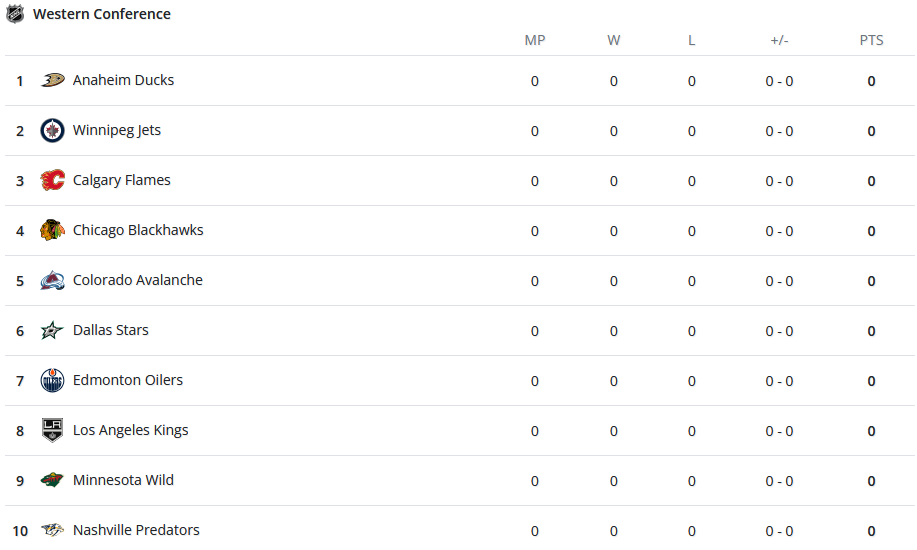
Below is an example on how you could render league associated standings
query Parameters
| leagueType |
string
Example:
leagueType=MLB
|
| limit |
number
[ 0 .. 10 ]
Default:
10
Example:
limit=5
|
| offset |
number
>= 0
Default:
0
Example:
offset=0
|
| leagueName |
string
Example:
leagueName=National League (MLB)
|
| abbreviation |
string
Example:
abbreviation=NL
|
| year |
number
Example:
year=2024
|
header Parameters
|
x-rapidapi-host
required
|
string
mlb-college-baseball-api.p.rapidapi.com |
|
x-rapidapi-key
required
|
string
Rapid API Token |
Responses
Response samples
- 200
- 400
- 500
{
-
"data":
[
-
{
-
"leagueName":
"Cactus League
(MLB)",
-
"abbreviation":
"CAC",
-
"year":
2024,
-
"leagueType":
"MLB",
-
"seasonType":
"Spring Training",
-
"startDate":
"2024-02-15T08:00:00.000Z",
-
"endDate":
"2024-03-27T06:59:00.000Z",
-
"data":
[
-
{
-
"id":
58,
-
-
"name":
"Dodgers",
-
"stats":
[
-
{
-
"description":
"Number
of
Overtime
Losses",
-
"abbreviation":
"OTL",
-
"displayValue":
"0"
}
]
}
]
}
],
-
"pagination":
{
-
"totalCount":
490,
-
"offset":
20,
-
"limit":
100
},
-
"plan":
{
-
"tier":
"BASIC",
-
"message":
"Some results might be hidden
with FREE tier. Check your API
coverage for more information:
https://rapidapi.com/highlightly-api-highlightly-api-default/api/sport-highlights-api/details"
}
}

Get all odds
Prematch odds refresh interval: Multiple times a day
Live odds refresh interval: Once every 10 minutes
Note: Endpoint is not available in the Basic/Free plan.
Retrieve a list of match odds based on the requested query
parameters. With oddsType query parameter you
can specify whether you want prematch or
live odds. If you do not set a specific
value prematch odds will be returned.
At least one primary query parameter needs to be specified
before you can retrieve the data (timezone,
limit, offset,
oddsType are considered secondary).
The most popular way of getting match odds is by
specifying the matchId query parameter. You
can also utilise the date parameter alongside
the timezone to fetch all match odds for a
given day. By specifying league or bookmaker related
fields you can further narrow down your search.
As it stands, we currently offer the support for the following markets:
| Market | Description |
|---|---|
| Home/Away |
The possible outcomes for the mentioned market are
either Home or Away. There
is no possible way for the game to end in a
Draw.
|
| Over/Under |
This is considered a complex market. It is split
into multiple possible variants such as
"Over/Under 7.5",
"Over/Under 9.5" points and so on. The
possible outcome of a variant is either
Over or Under.
|
| Asian Handicap |
This is considered a complex market. It is split
into multiple possible variants such as
"Asian Handicap -0.5/+0.5",
"Asian Handicap -1.5/+1.5" and so on. The
possible outcome of a variant is either
Home or Away.
|
| Odd or Even |
The Odd or Even market defines whether the score of
both teams will be either Odd or
Even.
|
There are two other important query parameters. The
limit parameter defines what the number of
returned match odds will be. If the number of actual match
odds is above the limit value you can make
subsequent requests by increasing the
offset value.
Match odds are available up to 28 days after the game finishes and up to 7 days before the game starts.
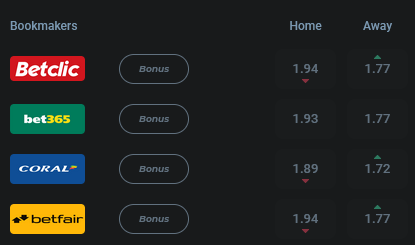
Below is an example of what can be achieved with bookmaker odds on a match basis:
query Parameters
| oddsType |
string
Example:
oddsType=prematch
Defines whether live or prematch odds will be returned. |
| leagueName |
string
Example:
leagueName=MLB
|
| timezone |
string
Default:
"Etc/UTC"
Example:
timezone=Europe/London
Valid timezone identifier. |
| bookmakerId |
number
Example:
bookmakerId=7122
|
| limit |
number
[ 0 .. 5 ]
Default:
5
Example:
limit=5
|
| offset |
number
>= 0
Default:
0
Example:
offset=0
|
| matchId |
number
|
| bookmakerName |
string
Example:
bookmakerName=Stake.com
|
| date |
string
Date that follows the YYYY-MM-DD format. |
header Parameters
|
x-rapidapi-host
required
|
string
mlb-college-baseball-api.p.rapidapi.com |
|
x-rapidapi-key
required
|
string
Rapid API Token |
Responses
Response samples
- 200
- 400
- 500
{
-
"data":
[
-
{
-
"matchId":
394,
-
"odds":
[
-
{
-
"bookmakerId":
53,
-
"bookmakerName":
"Megapari
Sport",
-
"type":
"prematch",
-
"market":
"Odd or
Even",
-
"values":
[
-
{
-
"odd":
2.8,
-
"value":
"Home"
}
]
}
]
}
],
-
"pagination":
{
-
"totalCount":
490,
-
"offset":
20,
-
"limit":
100
},
-
"plan":
{
-
"tier":
"BASIC",
-
"message":
"Some results might be hidden
with FREE tier. Check your API
coverage for more information:
https://rapidapi.com/highlightly-api-highlightly-api-default/api/sport-highlights-api/details"
}
}
Get all bookmakers
Refresh interval: Once a day
Retrieve a list of supported bookmakers.
There are two important parameters that are used to
navigate through the pagination. The
limit parameter defines what the number of
returned bookmakers will be. If the number of actual
bookmakers is above the limit value you can
make subsequent requests by increasing the
offset value.
The bookmakers name or id can be
used to filter data from the odds endpoint.
query Parameters
| name |
string
Example:
name=Megapari Sport
|
| limit |
number
[ 0 .. 100 ]
Default:
20
Example:
limit=20
|
| offset |
number
>= 0
Default:
0
Example:
offset=0
|
header Parameters
|
x-rapidapi-host
required
|
string
mlb-college-baseball-api.p.rapidapi.com |
|
x-rapidapi-key
required
|
string
Rapid API Token |
Responses
Response samples
- 200
- 400
- 500
{
-
"data":
[
-
{
-
"id":
53,
-
"name":
"Megapari Sport"
}
],
-
"pagination":
{
-
"totalCount":
490,
-
"offset":
20,
-
"limit":
100
},
-
"plan":
{
-
"tier":
"BASIC",
-
"message":
"Some results might be hidden
with FREE tier. Check your API
coverage for more information:
https://rapidapi.com/highlightly-api-highlightly-api-default/api/sport-highlights-api/details"
}
}
Get bookmaker by id
Retrieve bookmaker information by specifying the bookmaker id path parameter.
Note: Used to check whether a bookmaker still exists or had its information updated.
path Parameters
|
id
required
|
number
Requested bookmaker id. |
header Parameters
|
x-rapidapi-host
required
|
string
mlb-college-baseball-api.p.rapidapi.com |
|
x-rapidapi-key
required
|
string
Rapid API Token |
Responses
Response samples
- 200
- 400
- 500
[
-
{
-
"id":
53,
-
"name":
"Megapari Sport"
}
]
Get last five finished games for a specific team id
Refresh interval: Immediately once a game is considered finished
Retrieve a list of the last five finished games for a specific team. If a game was not finished (e.g. was cancelled or postponed) it will not be returned.
Specify teamId query parameter to retrieve
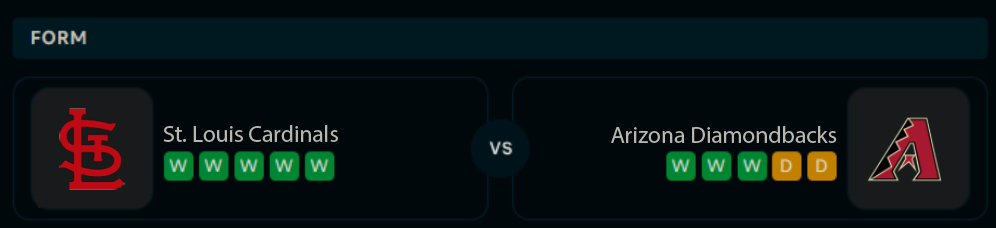
the data. Endpoint is used to create a form section
between two teams that are playing a match. Below is an
example of what can be achieved:
query Parameters
|
teamId
required
|
number
Example:
teamId=10291525
|
header Parameters
|
x-rapidapi-host
required
|
string
mlb-college-baseball-api.p.rapidapi.com |
|
x-rapidapi-key
required
|
string
Rapid API Token |
Responses
Response samples
- 200
- 400
- 500
[
-
{
-
"id":
394,
-
"round":
"regular-season",
-
"date":
"2024-03-06T00:30:00.000Z",
-
"league":
"NCAA",
-
"season":
2024,
-
"awayTeam":
{
-
"id":
219,
-
-
"name":
"Bears",
-
"displayName":
"Baylor",
-
"abbreviation":
"BAY"
},
-
"homeTeam":
{
-
"id":
219,
-
-
"name":
"Bears",
-
"displayName":
"Baylor",
-
"abbreviation":
"BAY"
},
-
"state":
{
-
"description":
"Finished",
-
"report":
"Final",
-
"score":
{
-
"home":
{
-
"hits":
4,
-
"errors":
2,
-
"innings":
[
-
0,
-
0,
-
1,
-
1,
-
0,
-
0,
-
1,
-
1,
-
1
]
},
-
"away":
{
-
"hits":
4,
-
"errors":
2,
-
"innings":
[
-
0,
-
0,
-
1,
-
1,
-
0,
-
0,
-
1,
-
1,
-
1
]
},
-
"current":
"5 - 8"
}
}
}
]
Get head 2 head games
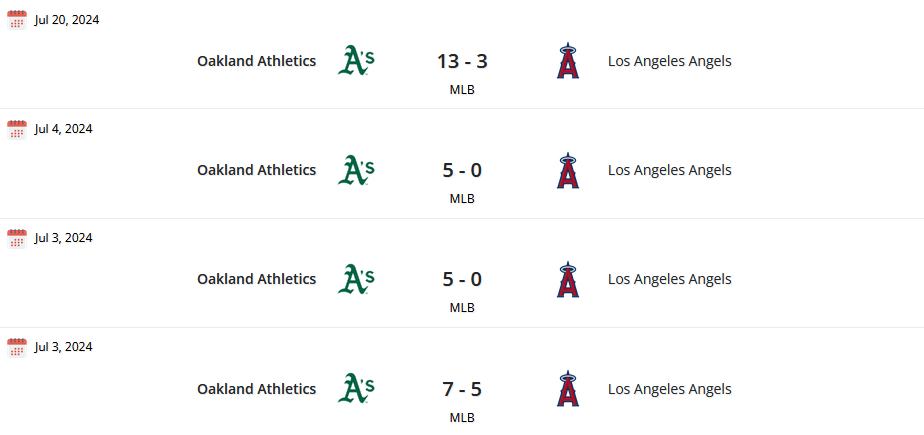
Retrieve a list of the last ten head 2 head games between two teams. Compare the two teams to find out who is stronger based on their past match results.
Specify teamIdOne and
teamIdTwo query parameters to retrieve the
data. The order of team ids does not matter.
Below is an example of what you can achieve with the data:
query Parameters
|
teamIdOne
required
|
number
Example:
teamIdOne=10291175
|
|
teamIdTwo
required
|
number
Example:
teamIdTwo=10291176
|
header Parameters
|
x-rapidapi-host
required
|
string
mlb-college-baseball-api.p.rapidapi.com |
|
x-rapidapi-key
required
|
string
Rapid API Token |
Responses
Response samples
- 200
- 400
- 500
[
-
{
-
"id":
394,
-
"round":
"regular-season",
-
"date":
"2024-03-06T00:30:00.000Z",
-
"league":
"NCAA",
-
"season":
2024,
-
"awayTeam":
{
-
"id":
219,
-
-
"name":
"Bears",
-
"displayName":
"Baylor",
-
"abbreviation":
"BAY"
},
-
"homeTeam":
{
-
"id":
219,
-
-
"name":
"Bears",
-
"displayName":
"Baylor",
-
"abbreviation":
"BAY"
},
-
"state":
{
-
"description":
"Finished",
-
"report":
"Final",
-
"score":
{
-
"home":
{
-
"hits":
4,
-
"errors":
2,
-
"innings":
[
-
0,
-
0,
-
1,
-
1,
-
0,
-
0,
-
1,
-
1,
-
1
]
},
-
"away":
{
-
"hits":
4,
-
"errors":
2,
-
"innings":
[
-
0,
-
0,
-
1,
-
1,
-
0,
-
0,
-
1,
-
1,
-
1
]
},
-
"current":
"5 - 8"
}
}
}
]
Get linups by match id
Lineups should be queried up to a few hours before the game starts.
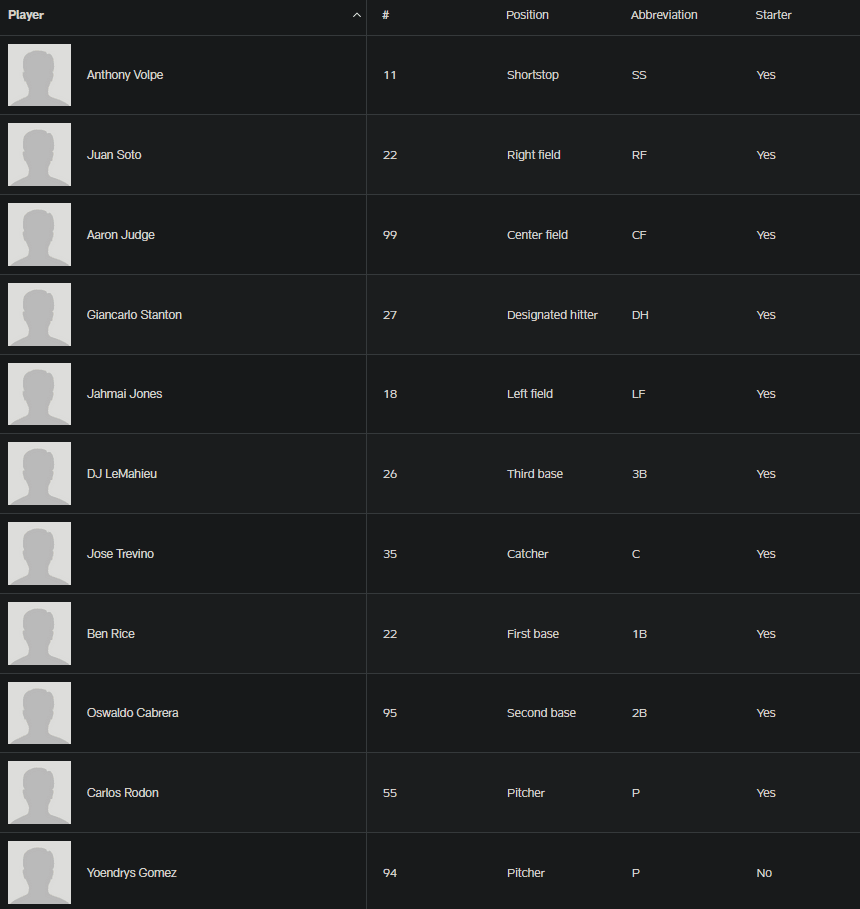
Retrieve home and away team lineups for a specific match.
Below is an example of what you can aim to achieve with the lineup endpoint:
path Parameters
|
matchId
required
|
number
Requested match id. |
header Parameters
|
x-rapidapi-host
required
|
string
mlb-college-baseball-api.p.rapidapi.com |
|
x-rapidapi-key
required
|
string
Rapid API Token |
Responses
Response samples
- 200
- 400
- 500
{
-
"home":
{
-
"team":
{
-
"id":
219,
-
-
"name":
"Bears",
-
"displayName":
"Baylor",
-
"abbreviation":
"BAY",
-
"league":
"NCAA"
},
-
"lineup":
[
-
{
-
"id":
619412,
-
"jersey":
22,
-
"player":
"Parker
Meadows",
-
"position":
"Center
field",
-
"positionAbbreviation":
"CF",
-
"isStarter":
true
}
]
},
-
"away":
{
-
"team":
{
-
"id":
219,
-
-
"name":
"Bears",
-
"displayName":
"Baylor",
-
"abbreviation":
"BAY",
-
"league":
"NCAA"
},
-
"lineup":
[
-
{
-
"id":
619412,
-
"jersey":
22,
-
"player":
"Parker
Meadows",
-
"position":
"Center
field",
-
"positionAbbreviation":
"CF",
-
"isStarter":
true
}
]
}
}
Retrieve player box score for specified match id
Refresh interval: Every minute
Retrieve detailed per-player
MLB box score statistics by specifying
the matchId as the path parameter.
The response is an array with two elements:[homeTeam, awayTeam]
Each team object contains general team information and a list of player box scores, including both batting and pitching statistics.
Team Structure
Each team (home or away) has the following shape:
| Field | Description |
|---|---|
| id | Unique identifier for the team. |
| name | Team name. |
| logo | Team logo identifier or URL, if available. |
| boxScores | List of per-player box score records for the team. |
Player Box Score
Each item in boxScores represents a single
player’s performance in the match.
Player Metadata
| Field | Description |
|---|---|
| id | Unique identifier for the player. |
| name | Player’s display name. |
Player Statistics
Player performance data is provided as a list of statistic
records.
Each record includes a statistic name, its
category, and the recorded value.
| Field | Description |
|---|---|
| name |
Name of the statistic (e.g.
Total At-Bats,
Innings Pitched).
|
| group |
Statistic category (Batting or
Pitching).
|
| value | Numeric value of the statistic. |
Batting Statistics Explained
-
Total At-Bats (AB)
Number of official at-bats for the player. -
Total Runs Scored (R)
Number of times the player scored a run. -
Total Hits (H)
Total number of hits recorded by the player. -
Total Runs Batted In (RBI)
Number of runs driven in by the player’s offensive actions. -
Total Home Runs (HR)
Number of home runs hit. -
Total Walks (BB)
Number of bases on balls earned. -
Total Strikeouts (SO)
Number of times the player struck out while batting. -
Total Pitches Thrown (Batting)
Total pitches seen by the player while at bat. -
Batting Average (AVG)
Hits divided by at-bats. -
On-Base Percentage (OBP)
Frequency at which the player reaches base safely. -
Slugging Percentage (SLG)
Measure of batting power based on total bases per at-bat.
Pitching Statistics Explained
-
Innings Pitched (IP)
Total number of innings pitched. -
Hits Allowed (H)
Number of hits allowed by the pitcher. -
Runs Allowed (R)
Total runs given up. -
Total Earned Runs (ER)
Runs that scored without defensive errors. -
Total Walks Allowed (BB)
Number of batters walked. -
Total Strikeouts (SO)
Number of batters struck out. -
Home Runs Allowed (HR)
Number of home runs conceded. -
Earned Run Average (ERA)
Average number of earned runs allowed per nine innings. -
Total Pitches Thrown (Pitching)
Total number of pitches thrown by the pitcher.
Notes
- A player may appear with batting stats, pitching stats, or both.
- Some players may have zero values if they did not record a statistic in that category.
- Statistic availability may vary depending on player participation in the match.
path Parameters
|
id
required
|
number
Requested match id |
header Parameters
|
x-rapidapi-host
required
|
string
mlb-college-baseball-api.p.rapidapi.com |
|
x-rapidapi-key
required
|
string
Rapid API Token |
Responses
Response samples
- 200
- 400
- 500
[
-
{
-
"team":
{
-
"id":
10291185,
-
"name":
"Toronto Blue Jays",
-
"logo":
"https://highlightly.net/baseball/images/teams/10291185.png
"
},
-
"boxScores":
[
-
{
-
"player":
{
-
"id":
482237,
-
"name":
"George
Springer"
},
-
"statistics":
[
-
{
-
"name":
"Total
At-Bats",
-
"group":
"Batting",
-
"value":
6
}
]
}
]
}
]
Get all players
Refresh interval: 15 minutes
Route returns only general player information. For additional player details check the
players/{playerId}andplayers/{playerId}/statisticsroutes.
Retrieve a list of players based on the requested query parameters.
Returned results will be paginated. The
limit parameter defines what the number of
returned players will be. If the number of actual players
is above the limit value you can make
subsequent requests by increasing the
offset value.
query Parameters
| name |
string
Example:
name=Reese Albert
|
| limit |
number
[ 0 .. 1000 ]
Default:
1000
Example:
limit=1000
|
| offset |
number
>= 0
Default:
0
Example:
offset=0
|
header Parameters
|
x-rapidapi-host
required
|
string
mlb-college-baseball-api.p.rapidapi.com |
|
x-rapidapi-key
required
|
string
Rapid API Token |
Responses
Response samples
- 200
- 400
- 500
{
-
"data":
[
-
{
-
"id":
342182,
-
"fullName":
"Reese Albert",
-
"logo":
"string"
}
],
-
"pagination":
{
-
"totalCount":
490,
-
"offset":
20,
-
"limit":
100
},
-
"plan":
{
-
"tier":
"BASIC",
-
"message":
"Some results might be hidden
with FREE tier. Check your API
coverage for more information:
https://rapidapi.com/highlightly-api-highlightly-api-default/api/sport-highlights-api/details"
}
}
Get player summary by player id
Refresh interval: Once a day
Retrieve detailed player summary for specified
playerId.
Detailed player summary consists of the following information:
| Type | Description |
|---|---|
| Profile | Provides a structured summary of a player's personal and professional profile. It includes key details such as current team affiliation, physical attributes (height, weight), biographical data (name, birth date, birthplace, citizenship), and playing positions. The data reflects both the player's current career status and positional versatility, offering a higher level overview which is useful for scouting, analysis, or profile display. |
path Parameters
|
id
required
|
number
Requested player id. |
header Parameters
|
x-rapidapi-host
required
|
string
mlb-college-baseball-api.p.rapidapi.com |
|
x-rapidapi-key
required
|
string
Rapid API Token |
Responses
Response samples
- 200
- 400
- 500
[
-
{
-
"id":
342182,
-
"fullName":
"Reese Albert",
-
"logo":
"string",
-
"profile":
{
-
"fullName":
"Reese Albert",
-
"birthPlace":
"Jupiter, FL, United
States",
-
"birthDate":
"10.07.1999",
-
"height":
"6' 2\"",
-
"jersey":
"string",
-
"weight":
"190 lbs",
-
"isActive":
true,
-
"debut":
0,
-
"position":
{
-
"main":
"Unknown",
-
"abbreviation":
"UN"
},
-
"team":
{
-
"id":
10291561,
-
-
"name":
"Seminoles",
-
"league":
"MLB",
-
"displayName":
"Florida
State",
-
"abbreviation":
"FSU"
}
}
}
]

Get player statistics by player id
Refresh interval: Once a day
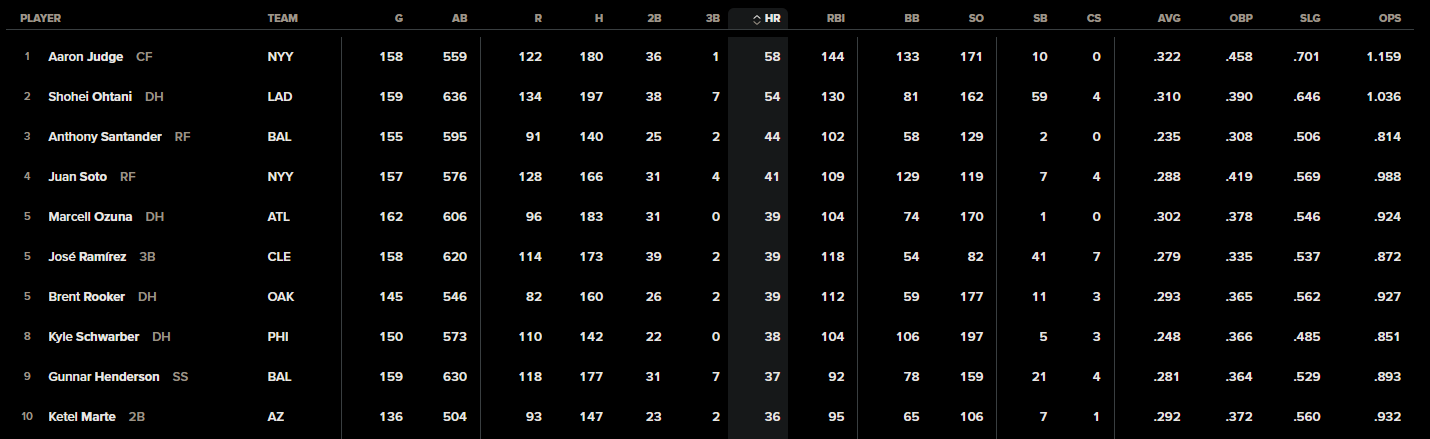
Retrieve detailed player statistics for specified
playerId.
Detailed player statistics are aggregated on a
perSeason level. Each season has the
following available coverage:
| Type | Description |
|---|---|
| Entire | Combines both regular season and post-season statistics. Pre-season data is not included. |
| Season | Includes only regular season statistics. |
Recorded stats are dependant on the player position. In total, the following stats are available:
| Type | Description |
|---|---|
| Pitching | Statistics that measure a pitcher's performance in preventing runs and controlling opposing hitters (innings pitched, strikeouts, walks, earned runs). |
| Batting | Statistics that measure a player's offensive performance at the plate, including hitting ability, power and on-base success (hits, batting average, home runs, RBIs). |
Note: As mentioned earlier, statistics are associated with specific player positions. This means the results you receive will vary depending on the player's position.
path Parameters
|
id
required
|
number
Requested player id. |
header Parameters
|
x-rapidapi-host
required
|
string
mlb-college-baseball-api.p.rapidapi.com |
|
x-rapidapi-key
required
|
string
Rapid API Token |
Responses
Response samples
- 200
- 400
- 500
[
-
{
-
"id":
342182,
-
"fullName":
"Reese Albert",
-
"logo":
"string",
-
"perSeason":
[
-
{
-
"stats":
[
-
{
-
"name":
"Player
Hit By
Pitch",
-
"value":
7,
-
"category":
"Batting"
}
],
-
"teams":
[
-
{
-
"id":
10291561,
-
-
"name":
"Seminoles",
-
"league":
"MLB",
-
"displayName":
"Florida
State",
-
"abbreviation":
"FSU"
}
],
-
"league":
"MLB",
-
"season":
2022,
-
"seasonBreakdown":
"Entire"
}
]
}
]
Returns detailed match statistics for given id
Refresh interval: Every minute
Retrieve aggregated
MLB team statistics for a single match by
specifying the matchId as the path parameter.
The response is an array with two elements:[teamA, teamB]
Each element represents a team and contains general team information along with aggregated statistics across batting, pitching, and fielding.
Team Structure
Each team object has the following shape:
| Field | Description |
|---|---|
| id | Unique identifier for the team. |
| name | Team name. |
| logo | Team logo identifier or URL, if available. |
| statistics | List of aggregated statistical records for the team. |
Team Statistics
Each item in statistics represents a single
aggregated metric recorded during the match.
Statistic Record
| Field | Description |
|---|---|
| name |
Name of the statistic (e.g. Total Hits,
Earned Run Average).
|
| group |
Statistic category (Batting,
Pitching, or Fielding).
|
| value | Numeric value of the statistic. |
Batting Statistics
Batting statistics summarize the team’s offensive performance.
-
Total At Bats
Number of official team at-bats. -
Total Hits
Total number of hits recorded by the team. -
Total Runs
Total runs scored by the team. -
Total RBIs
Total runs driven in by the team’s offensive actions. -
Total Home Runs
Total home runs hit by the team. -
Total Walks
Total bases on balls earned. -
Total Strikeouts
Total strikeouts by batters. -
Batting Average (AVG)
Team hits divided by total at-bats. -
On-Base Percentage (OBP)
Frequency at which the team reaches base safely. -
Slugging Percentage (SLG)
Measure of team batting power based on total bases per at-bat. -
On-Base Plus Slugging (OPS)
Combined on-base and slugging percentage.
Pitching Statistics
Pitching statistics summarize the team’s performance while pitching.
-
Innings Pitched (IP)
Total innings pitched by the team. -
Hits Allowed (H)
Number of hits allowed by team pitchers. -
Runs Allowed (R)
Total runs conceded. -
Total Earned Runs (ER)
Runs that scored without defensive errors. -
Total Walks Allowed (BB)
Number of batters walked. -
Total Strikeouts (SO)
Number of batters struck out. -
Home Runs Allowed (HR)
Total home runs conceded. -
Earned Run Average (ERA)
Average number of earned runs allowed per nine innings. -
Total Pitches Thrown
Total number of pitches thrown by team pitchers.
Fielding Statistics Explained
Fielding statistics summarize the team’s defensive performance.
-
Total Putouts
Number of recorded outs by fielders. -
Total Assists
Number of assists recorded. -
Total Errors
Number of defensive errors committed. -
Total Chances
Total defensive chances. -
Fielding Percentage
Percentage of successful defensive plays.
Notes
- All statistics are aggregated at the team level.
- Not all statistic categories or metrics are guaranteed to be present for every match.
-
Some values may be
0depending on match flow and team participation.
path Parameters
|
id
required
|
number
Requested match id |
header Parameters
|
x-rapidapi-host
required
|
string
mlb-college-baseball-api.p.rapidapi.com |
|
x-rapidapi-key
required
|
string
Rapid API Token |
Responses
Response samples
- 200
- 400
[
-
{
-
"team":
{
-
"id":
10291185,
-
"name":
"Toronto Blue Jays",
-
-
"statistics":
[
-
{
-
"name":
"Total
Strikeouts",
-
"value":
12,
-
"group":
"Batting"
}
]
}
}
]